Who Can Delete Photos in a Shared Album
Last updated: October 18, 2026
In a shared photo album, the right to delete belongs to the link a photo arrived through, not to the person holding it. A view-only link can remove nothing. A contribute link can remove the photos uploaded through that same link and nothing else. An admin link can remove anything in the album. Work out which of those you handed out and you already know who can clean up after the weekend.

The Permission Sits on the Link, Not on the Person
Most people picture a shared album the way they picture a group chat: a list of members, each with a role, and the owner able to change anyone's role later. Almost no photo sharing product works that way. What actually exists is a set of links, each one carrying a permission, and whoever is holding a given link inherits that permission for as long as it stays alive.
The practical consequence catches people out constantly. If you sent your sister the view-only link on Friday and the contribute link on Saturday, she has two different levels of access depending on which message she opens. She is not a contributor. The Saturday link is. (Signed in to Viallo, she keeps the stronger one once she has opened it.)
This is also why the answer to "can they delete my photos" is never a property of the person. It is a property of what you sent them, which means it is something you decided, possibly weeks ago, probably without thinking about deletion at all.
What Each Role Can Actually Remove
Viallo is a private photo sharing platform where albums open in a browser with no account on the viewer's side, photos keep their full resolution, and access runs through the links you create. It carries three link permissions, and the difference between them is almost entirely about removal rather than about viewing.
| Link permission | Add photos | Delete or edit its own uploads | Delete anyone's photo | Delete the album |
|---|---|---|---|---|
| View only | No | No | No | No |
| Contribute | Yes | Yes, through the same link | No | No |
| Admin | Yes | Yes | Yes, anything in that album | Yes |
| Owner (signed in) | Yes | Yes | Yes | Yes |
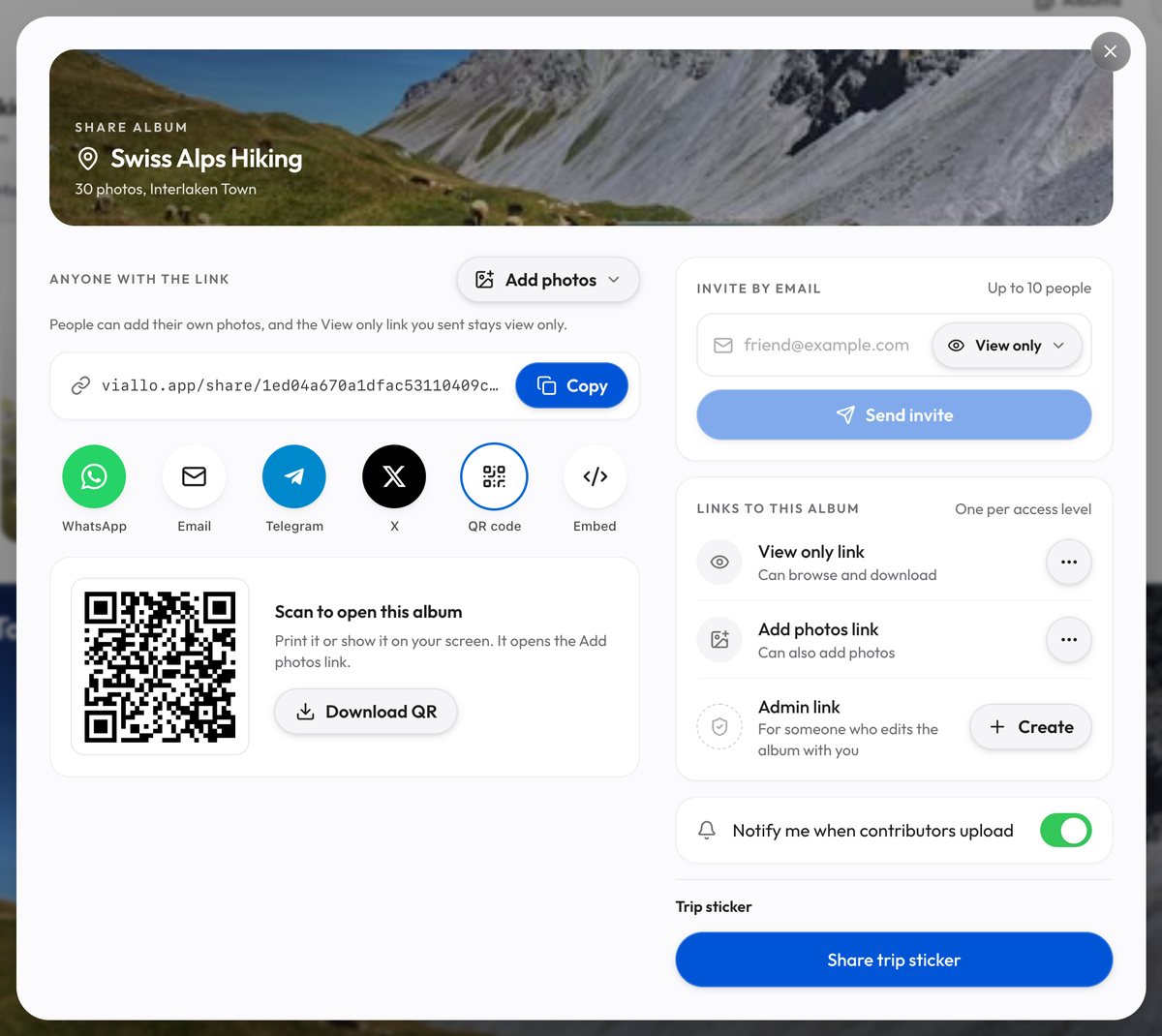
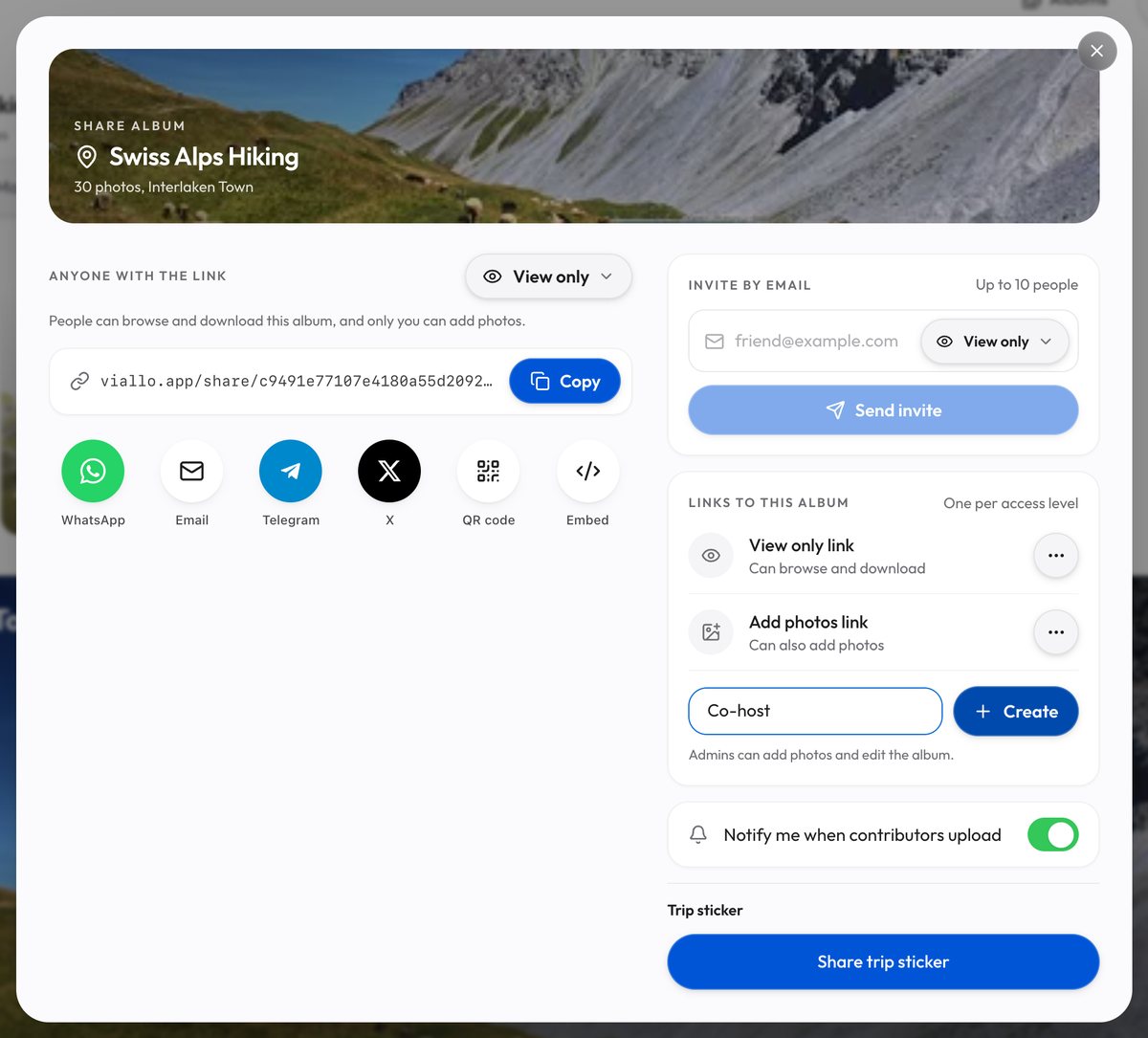
The pill next to Anyone with the link, at the top of the Share sheet, offers two of those: View only, and Add photos, which is the contribute permission. Admin is the third, and it sits lower in the same sheet, as the Admin link row under Links to this album, made with its Create button. Whoever holds an Admin link can delete any photo and the album itself, and so can anyone you invite by email as Admin, so the power to remove other people's photos stays with the account that owns the album only until that account hands Admin out, as a link or as an invite.

Your Own Photo, a Different Link
Here is the rule that surprises people, and it is worth knowing before it happens to you. A contributor can delete a photo it uploaded through that link. The check is not "did this person upload it", because a link has no idea who is holding it. The check is whether the photo was uploaded through the exact link now asking to remove it.
So if you send someone a contribute link, they add forty photos, and a week later you send a fresh one because you revoked the first, the photos they already added are no longer theirs to remove. They will still see them in the album. The delete control simply will not be there. The same is true if they uploaded from the link you texted and then opened the one you emailed.
There is no way to look at an album and work out which link brought which photo, either. Viallo hands each viewer only the marker for their own uploads and nulls the rest, so nobody can read another link's identity off the album. That is deliberate, and it is the reason the ownership question has to be answered by whoever runs the album rather than negotiated among the guests.
Whose Photos Are They Once They Are in Your Album?
Yours, in every sense that matters operationally. When a guest uploads through a contribute link, the photo is stored against the album owner's account, counts against the album owner's storage, and is deleted as the album owner when anyone removes it. Whoever holds the contribute link is granted a narrow permission to undo uploads made through it, their own and other guests' alike; they are not holding a copy on their side of a sync.
That is the opposite of how Google Photos handles a collaborative album, where a contributed photo generally counts against the storage of whoever uploaded it and continues to live in their own library after it leaves your album. Neither model is wrong. They answer different questions, and the Viallo one answers "will this album still be complete in five years" rather than "whose quota is this".

How the Other Platforms Split It
The pattern across the mainstream products is consistent: contributors can withdraw what they added, owners can remove anything, and the file-syncing tools are the outlier because they were never built around the idea of an album at all.
| Platform | Contributor removes own upload | Contributor removes someone else's | Where the removed photo goes |
|---|---|---|---|
| Viallo (contribute link) | Yes, through the same link | Only photos that came in through the same link | Deleted outright, no trash |
| Google Photos shared album | Yes | No, the album owner only | Out of the album; their library copy stays |
| iCloud Shared Albums | Yes | No, the album owner only | Out of the album for everyone |
| Dropbox shared folder, edit access | Yes | Yes, anyone's files | Folder trash, restorable for 30 days on Basic and Plus |
| WeTransfer | No, there is nothing to manage | No | The whole transfer expires together |
Verdict: for an album where several people are adding photos and you want one person accountable for what stays in it, a shared Dropbox folder is the wrong tool. Edit access there is symmetric, so the guest who uploaded four photos can also delete the four hundred you uploaded, and the only thing standing between you and that is the trash. For collecting photos from a group without handing out that much power, a contribute link that is scoped to its own uploads is the shape you want, and letting guests add photos without an account is what makes people actually do it.
There Is No Undo, and That Is the Part to Plan Around
When a photo is deleted from a Viallo album, it is deleted. There is no Recently Deleted folder, no thirty-day grace period, and no owner-side restore. The record goes, and the stored files are queued for removal behind it. The interface asks you to confirm first, and that confirmation is the whole of the safety net.
This is a real difference from the platforms most people are used to, and it cuts both ways. Google Photos keeps deleted items for 30 days, and iCloud gives you 30 in Recently Deleted, which is forgiving of a mistake and also means the photo you thought you had removed is still sitting on a server for a month. If what you want is for a photo to actually be gone when you say so, that is what you are getting here. If what you want is a safety net, keep your own copy of anything irreplaceable before you hand out a contribute link.
Deleting an album is separate, and it is the one destructive action a contribute link cannot reach at all. Only the owner or an admin link can do it, and it takes the photos with it.

Setting an Album Up So Cleanup Is Possible
Four decisions, all of them made when you create the links rather than after somebody uploads something unfortunate:
- Send one contribute link and keep sending the same one. Rotating links quietly strips people of the ability to remove their own uploads, which is the single most common way this goes wrong.
- Send view-only to everyone who is only there to look. It costs them nothing and it removes them from the deletion question entirely.
- Assume that nobody but you can remove the photos you uploaded, and that everyone holding the contribute link can remove whatever came in through it. An Admin link or an Admin invite reaches further: if a second pair of hands needs to tidy the album, the Admin link row in the Share sheet gives them that, along with the power to delete the album, so the safer version is usually that they send you what to remove.
- Keep your originals. Not because the product is unreliable, but because deletion here is final and the person deleting might be you at eleven at night.
If an album has already gone wrong, the repair is usually revoking the link rather than deleting anything, which works for every Viallo link. Revocation stops the access without touching the photos, which leaves you free to sort the album out at your own pace. The same logic is worth applying from the start when you create a shared album for a group you do not entirely control, and it pairs well with view-only sharing for the half of the guest list that was never going to upload anything.
Frequently Asked Questions
What is the best way to let people add photos to an album without letting them delete each other's?
On Viallo, give each group its own contribute link. A contribute link can remove only the photos uploaded through that link, so what you uploaded is safe, and a group can remove its own uploads but nothing another group sent. The album's Share sheet holds one Add photos link; for each further group, make a Can add photos link on the Profile sharing page with only this album ticked and Add new albums automatically off. Google Photos keeps contributors apart: each can remove only what they added.
How do I delete a photo somebody else put in my album?
Open the album signed in as the owner and delete it the way you would delete your own, because a photo uploaded through a contribute link is stored under your account. There is no approval queue and no notification to the person who uploaded it. If you want that person to be able to remove it themselves later, they need to still be holding the link they uploaded through.
Is it safe to send a contribute link to a group chat?
Reasonably, as long as you understand that the link is the credential and a group chat forwards easily. A contribute link cannot delete anything it did not upload and cannot delete the album, so your own photos are safe and the worst case is unwanted uploads, or one guest removing another's. The album's Add photos link takes no end date in the app, so once the weekend is over, revoke it from its row in the Share sheet and it stops working at once.
What is the difference between removing a photo and revoking the link?
Removing a photo destroys the photo and leaves the access alone; revoking a link destroys the access and leaves every photo where it is. Revocation is the reversible one in spirit, since you can always issue a new link, while a deleted photo in Viallo is gone with no trash to recover it from. Dropbox blurs this because its trash holds deleted files for 30 days on Basic and Plus, so the two actions feel more similar there than they are.
My cousin uploaded about two hundred photos of her dog to our wedding album. Now what?
You can remove them yourself as the album owner, and you do not need her to do anything. Select them in the album and delete, keeping in mind there is no undo, so it is worth being certain the dog photos really are the ones selected. If you would rather she took them back out herself, she can, provided she still has the link she uploaded through.