Guest-Only Photo Albums: The Two Ways to Limit Access
Last updated: October 18, 2026
Asking for a guest-only album is asking for one of two incompatible things. You can name the people, and then they need an account before they can look at anything. Or you can send a link that opens for whoever is holding it, and then there is no list of names to enforce. Most platforms ship both and put them in the same menu without saying which is which. For actual guests the link is almost always right, because guests are the people least likely to sign up for anything. What you give up is ever knowing who they were. What you keep is turning a link off, and deciding whether the holder can add photos or only look.

Guest-Only Means Two Different Things
There are two ways to limit who sees a photo album, and they are not variants of each other. A named invite restricts the album to accounts you list. A share link restricts nothing by identity, and controls what the holder can do instead. Viallo ships both, with viewers needing no account for the second. Google Photos ships both too.
The confusion is not the reader's fault. Every product calls the whole area "sharing" and hangs both mechanisms off one button, so the question "can I make this guest-only" gets answered yes by a product that means the first thing and yes by a product that means the second. They behave nothing alike after the first click.
The Named Invite: Exact People, at the Price of an Account
You add someone by email address. If the address has no Viallo account yet, Viallo holds it as a pending invite, marked No account yet, and shows them nothing until an account on that address claims it. That is the whole mechanism, and the account requirement is not incidental to it - the list is enforceable precisely because every entry on it is an identity the platform can check.
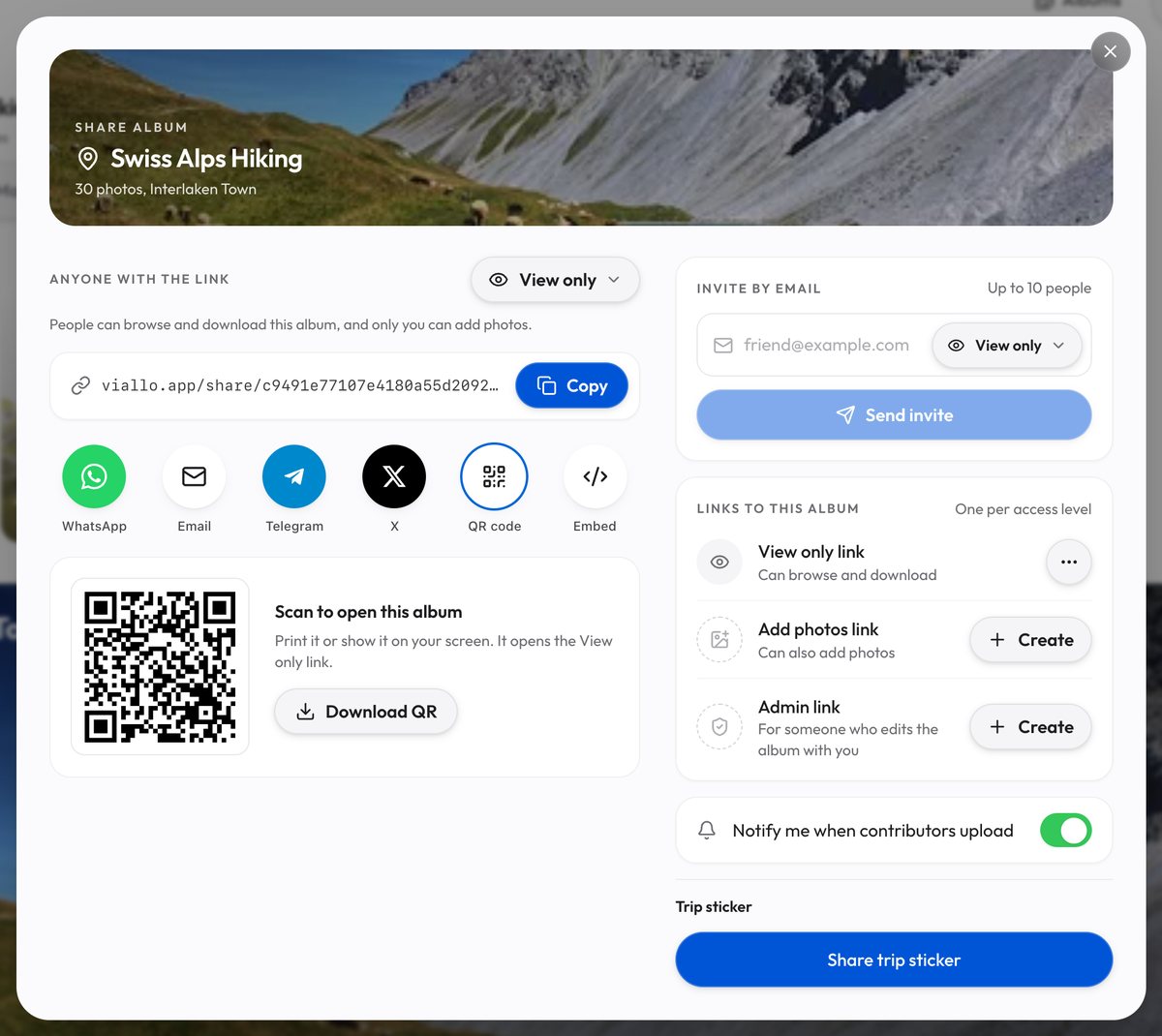
Viallo is a private photo sharing platform: photos are stored at full resolution, with no AI scanning and no training on what you upload. Photos carrying GPS data are grouped by location automatically, with a map view. A named share opens the whole album; there is no way to give one person a subset of it. The invite form has a role picker that starts on View only, and choosing Contribute or Admin gives that person the powers of the album's Add photos or Admin link. Keep those two roles for people who already have an account: to an address with no account yet, the invitation email carries that link itself, so a forwarded email lets whoever holds it in. One invite takes up to 10 addresses, and there is no cap on how many people you name, including on the free plan.
The failure mode is the obvious one. A named invite is worth exactly as much as the recipient's willingness to sign up, and the relatives you most want to send photos to are the ones who abandon a sign-up form at the phone verification step. Use named invites for the small group who will do it: a partner, a sibling, the two people who will actually add their own photos back.
The Share Link: No Account, Different Controls
A share link is a 32-character address built from 16 random bytes. Nobody arrives at it by guessing, which is what makes it private, and there is no sign-in in front of it, which is what makes it usable by a guest. Everything you control, you control from your side rather than theirs.
- Look, or look and contribute. An album has a View only link and an Add photos link, plus a third, the Admin link, which can also edit the album and delete any photo. The Add photos link lets the holder add their own photos to the album without making an account, which is the difference between sending a gallery and running one. To stop downloads, open the View only link's menu under Links to this album in the Share window and clear Allow download: the row then reads Can browse, and people who open that link get no download button. What turning downloads off actually blocks is a separate question, and worth reading before you assume view-only means what you hope.
- A chosen set of albums, not your library. One link can be pointed at the albums you pick, so the people at a wedding and the people on a hiking trip can hold different links into the same account; turn off Add new albums automatically, or albums you create later join it too. Most platforms tie one link to one album; the comparison of who lets you do this goes through the alternatives properly.
- Turn it off. In the Share window, each link under Links to this album has Revoke in its menu: the View only link, the Add photos link and the Admin link. It acts at once: anyone who opens that address without an account sees "This link was turned off", and Create on the emptied row makes a new link with a new address. This is the real access control on a link, and the one people forget they have.
- An end date, on the Admin link only. In the album's Share window, Set an end date gives the Admin link a date after which it stops working; left empty, it never expires. In the app the View only and Add photos links cannot take one, and a link made with Share albums never can.
- No password. Viallo does not put a password in front of an album, and the case for and against that is its own argument. The controls are the unguessable address, turning a link off, and an end date on the Admin link.
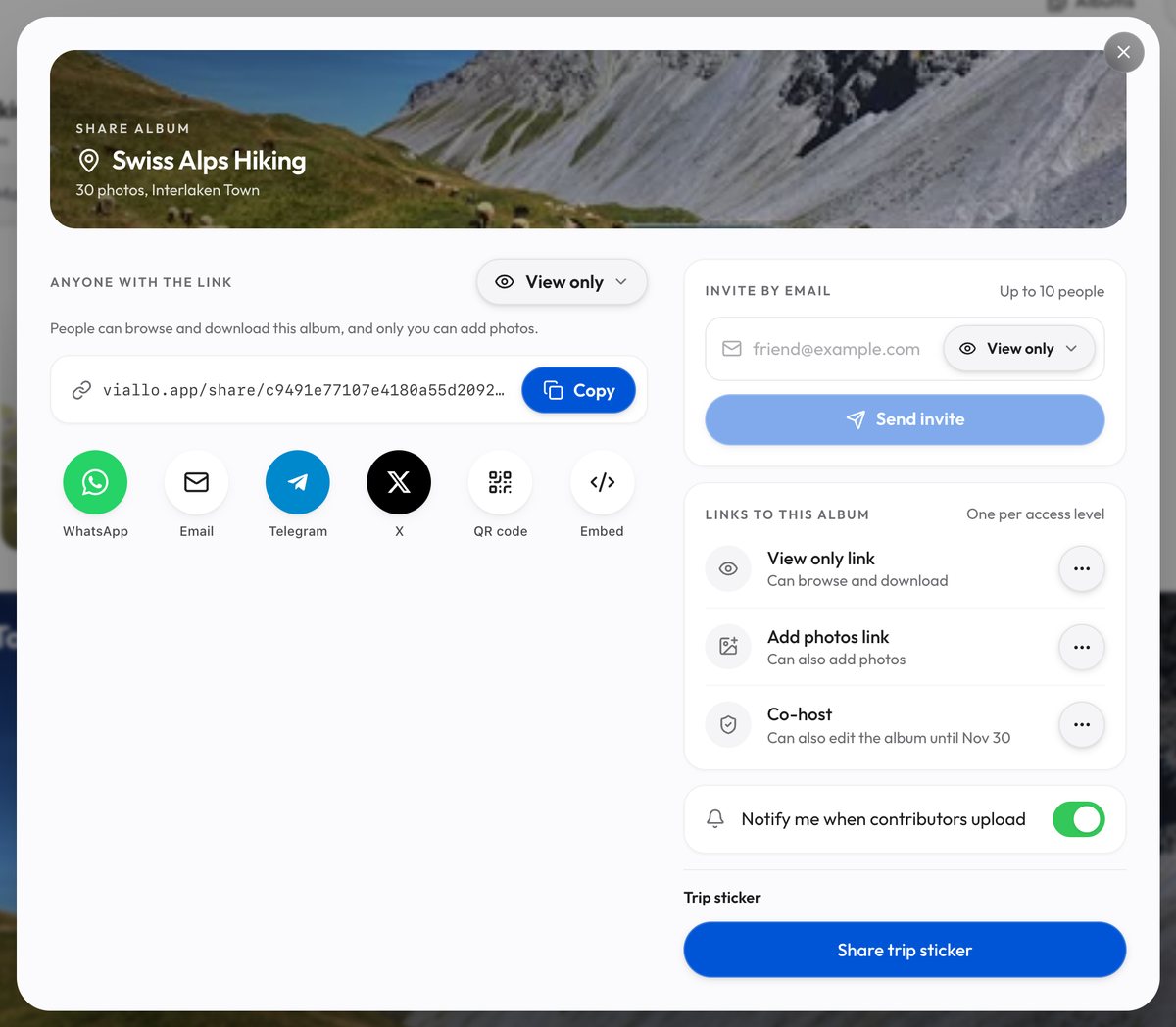
An album holds one link per access level, so it has exactly one View only link. For one view-only link per group, so that turning one off leaves the other groups in, make them with New link on the Profile sharing page, tick only this album and turn off Add new albums automatically: each is named and revoked on its own there, though none of them can take an end date. Revoke a link that went to forty people and you have cut off forty people.

What Each Platform Lets You Restrict
| Method | Guest needs an account | Limited to named people | Revoke later | Expiry date |
|---|---|---|---|---|
| Viallo named invite | Yes, to claim it | Yes | Yes, once accepted | Not applicable |
| Viallo share link | No | No | Yes | Admin link only, in the app |
| Google Photos shared album link | No, to view | No | Yes | No |
| iCloud Shared Album public link | No, to view | No | Yes | No |
| Dropbox shared folder link | No, to view | No | Yes | Paid plans |
The column that decides it is the second one, and every row says no except the invite. That is not a gap in the products. A link is an address, an address can be copied, and no product can make a copied address refuse to work for the wrong person without asking that person who they are - which is the account you were trying to avoid.
What You Can Actually See About Who Opened It
Never a name. A viewer who made no account has no name for the platform to record, so no amount of analytics turns a link into a guest list. This is the part worth reading twice, because it is the honest price of no-account sharing and it is where the marketing on every product in this category goes quiet.
What Viallo records on a link, on Plus and Pro:
- How many times it was opened, and how many distinct visitors that was.
- A day-by-day count of views over the last 30 days.
Per-visit detail - the time it happened, the device, the browser - is part of the analytics feature, which the free plan does not include. Plus, at $6.99 a month or $69.99 a year, includes it, and Pro, at $17.99 a month or $179.99 a year, shows the same. No plan ever attaches a person to a view.
In practice the counts answer the question people actually have, which is not "who" but "did it arrive". Zero unique visitors two days after you sent a link means the message never got opened, and that is worth knowing.

The Control You Do Not Get
Someone will forward the link. Not maliciously - your sister will paste it into the family group chat because that is where the family is, and now it is in a thread with eleven people in it and one of them has a work phone that syncs to a laptop somebody else uses. A link that needs no account cannot stop this, and a product that implies otherwise is selling you something it does not have.
What you can do is make forwarding cheap to undo rather than impossible to commit:
- One link per audience. Not one link per album. The wedding guests and the two cousins who are also uploading get different links, so revoking one does not cut off the other.
- Decide when it stops. A link for photos from one weekend does not need to work in 2029. In the app a view-only album link cannot take an end date, so put a reminder in your calendar to revoke it from its row in the Share window.
- Default to view-only. Contributor is for the people who are actually contributing, which is usually two or three of them, not the whole list.
- Use a named invite for the album you would mind about. Photos of somebody else's children are the clearest case. If you would be upset to find the link forwarded, the mechanism you want is the one that checks identity, and the cost is that your recipients have to sign up.

Which One You Actually Want
For guests, the share link is the better choice, because the entire definition of a guest is somebody who is not going to make an account for your holiday photos. The six ways of sharing without an account compares that decision across platforms. Send the album's View only link, revoke it from its row in the Share window when the weekend is over, and accept that you will know how many people opened it and not which ones.
For a standing group who will use it for years - the four people in a family who all add photos, a co-parent, a couple sharing everything - named invites are worth the sign-up friction once. View only invites survive forwarding, they can be revoked per person rather than per link, and the people on them will tolerate an account because they are getting a library out of it rather than one weekend.
Nothing stops you doing both on the same album, and most albums that matter end up that way: two or three named people who are really using it, and a link that goes out to everybody else and is revoked when the month is up.
Frequently Asked Questions
What is the best way to make a photo album guest-only?
Send a view-only share link rather than trying to restrict the album to named people. Viallo links open in any browser with no account, and every one of them can be revoked at any time from the Share window, which is the closest thing to guest-only that works for people who will not sign up. If the album is sensitive enough that forwarding would genuinely bother you, use a named invite instead and accept that every recipient needs an account.
How do I stop a guest album link from working?
In the album's Share window, open that link's menu under Links to this album and choose Revoke. It acts at once, with no confirmation, and anyone who opens the address without an account sees "This link was turned off". Anyone who opened it while signed in to Viallo keeps the album, view only, and is listed under Invite by email; the trash button beside their address removes them. Create on the emptied row makes a new link with a new address for the people who should keep access. This is why one link per audience is worth the extra thirty seconds: turning off a single link that went to forty people turns it off for all forty. Google Photos and iCloud Shared Albums both let you turn a link off too.
Is it private to share an album with a link instead of named invites?
Yes, in the sense that matters most: the address is 16 random bytes, so it is not discoverable, and Viallo does not index shared albums or scan them with AI. It is not private against forwarding, because anyone holding the address can pass it on. Treat the link as private-by-obscurity, plus a kill switch in Revoke, which is genuinely enough for holiday photos and not enough for a custody dispute.
What is the difference between an invite-only album and a link-shared album?
An invite-only album checks who you are; a link-shared album checks what you hold. Invite-only can name exactly five people and refuse the sixth, but all five need accounts. A link cannot tell the sixth person from the first, and in exchange nobody signs up for anything. Google Photos offers both under one Share button, which is where most of the confusion about this comes from.
Can I see who actually opened my album?
You can see how many, not who. On Plus and Pro, Viallo shows view counts and distinct visitors, and lists recent visits with the time and the browser and operating system. No plan attaches a name to a view, because a viewer who never made an account never gave one.