Share Several Photo Albums With One Link (2026)
Last updated: October 26, 2026
Not with Google Photos, iCloud Shared Albums or WeTransfer: their help pages, read on 26 October 2026, document sharing one album or one transfer at a time. A Dropbox shared folder carries every folder nested inside it. Viallo puts all your albums, or a set you pick, behind one link, and the all-albums link is the one its users choose.

Can you share more than one photo album with a single link?
Not on Google Photos, iCloud Shared Albums or WeTransfer, whose help pages describe one album or one transfer per share. The exceptions are a Dropbox shared folder, which shares everything nested inside it, and Viallo, where one link opens all your albums or the ones you pick.
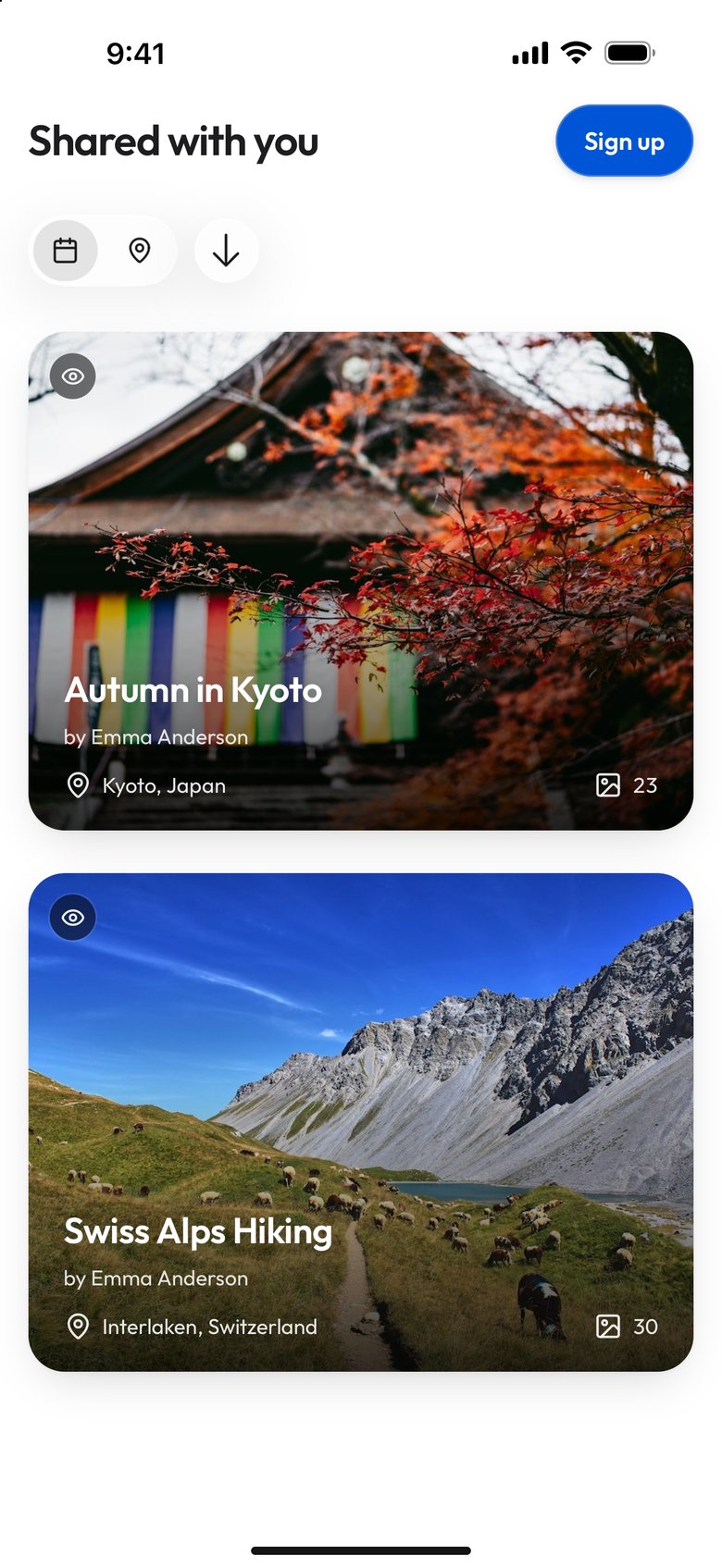
There is one setting worth knowing before you build anything on this. A link scoped to a chosen set of albums also picks up the albums you create next month, unless you turn off the switch "Add new albums automatically", which starts on. "Only these three" and "these three and whatever I make later" are different instructions, and that switch is where you choose between them. What matters is that you know which one you picked, and that the product tells you before the link exists rather than after your mother has seen something you meant to keep to yourself.
What each platform actually does
Of the five options checked, two put more than one album behind a single address, and they behave in opposite ways. A Dropbox folder is a container: share the parent and the recipient keeps getting everything inside it, including whatever you drop in tomorrow. A curated Viallo link is a selection: the recipient gets the albums you ticked, and the link grows only if you leave Add new albums automatically on. The other three document one album or one transfer per share.
The table was checked on 26 October 2026 against each service's own help page (Google Photos, Apple Shared Albums, Dropbox shared folders, WeTransfer) and, for Viallo, its own code. Each cell keeps the sentence it rests on in the dataset; "not checked" means no sentence on the page states it.
| Platform | One link, several albums? | What the recipient sees | Albums added later |
|---|---|---|---|
| Google Photos shared album | No documented way to name several albums in one link: the only documented share action starts inside a single album | That album, and anyone with access to it can add photos | not checked |
| iCloud Shared Albums | No documented way: a link is created per album from that album's Sharing Options | That album; invitees can add their own photos, videos and comments | not checked |
| Dropbox shared folder | Yes, by nesting: a shared folder carries all subfolders inside it | Everything inside the folder, with no way to exclude one nested folder while it sits inside a shared folder | Yes, automatically: later changes inside the folder reach members |
| WeTransfer | No documented way: one transfer produces one shareable link | not checked | not checked |
| Viallo curated link | Yes: a link is created with an explicit album list | Only the albums the link names; the filter runs where the albums are loaded for the viewer, not in the page the recipient is handed | The owner's choice: the switch is on when the dialog opens |

For handing someone your entire archive and never thinking about it again, a Dropbox shared folder is the simpler tool: Dropbox's sharing guide says changes inside a shared folder "are synced with members of that folder almost instantly". Its weakness is the same property. Dropbox lets you unshare a folder only if it "isn't inside another shared folder", so there is no way to say "everything in here except that one folder," and if your answer to "who should see this?" differs album by album, a folder cannot express it. The rest is in the Viallo and Dropbox comparison.
Google Photos and iCloud Shared Albums are built around the album as the unit of collaboration. Within one album, Google lets anyone with access add photos, and Apple lets invitees add their own photos, videos and comments. Neither help page describes a layer above the album that one link could open.
How do Viallo users share several albums today?
On Viallo's own data, the link that carries several albums is the all-albums link, not the hand-picked one. On 26 October 2026 we counted the multi-album links in Viallo's production database: links made between March and October 2026, counts only, with demo, test and staff accounts left out and no figure published that rests on fewer than ten owners. The query is query.js, and every number below is in dataset.csv.
| Viallo links counted on 26 October 2026 | Links | Owners |
|---|---|---|
| Links of both kinds, created Mar to Oct 2026 | 204 | 125 |
| Active all-albums links opening two or more albums today | 77 | 50 |
| Active all-albums links opening one album or none today | 17 | 13 |
| Curated links naming exactly one album | 88 | 61 |
| Of those, set to Can add photos | 82 | 56 |
| Curated links naming any other number of albums | fewer than 10 owners, not published | |
The median active all-albums link opens 2 albums today, and the median curated link names 1, for owners on Free and on Plus alike. So far the album picker has mostly made upload links for a single album: 82 of the 88 one-album links let the recipient add photos. Fewer than ten owners have made a curated link that names several albums, so this page has no usage figure for that case, only the capability described below. The switch Add new albums automatically has been recorded only since 16 October 2026, and too few curated links have been made since then to say how often it stays on.
How to share a chosen set of albums with one link
Viallo is a private photo sharing platform that stores photos at full resolution, never uses them to train AI, and lets anyone open a shared album in a browser without signing up. Its curated share link is the piece that does the job on this page: one address, one QR, and a set of albums you chose by hand. On the receiving end there is no account needed just to look - the link opens in whatever browser they already have.
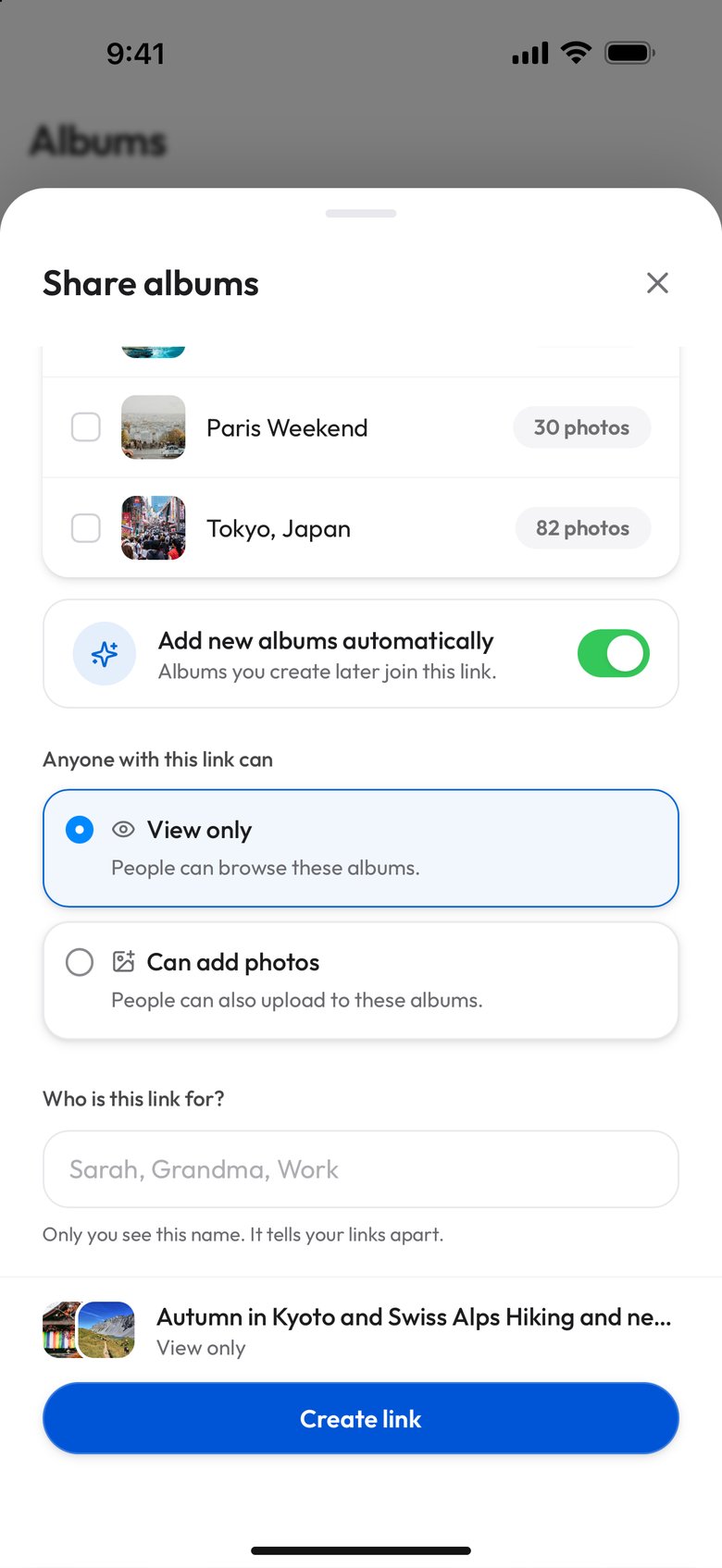
- Open your albums and tap Share, at the top of the page next to New Album. It is always there - it does not wait for an album to be empty or full. In the menu it opens, choose Share albums.
- Pick the albums this link should open. Tick them individually, or use Select all to include the whole library. A running count shows how many of your albums are selected, and the switch Add new albums automatically, on until you turn it off, decides whether albums you create later join the link.
- Choose what people can do with it: View only, which is the default, or Can add photos.
- Name it in "Who is this link for?" - "Sarah", "Grandma", "Work". The name is optional, only you ever see it, and in three months it is the difference between managing your links and guessing.
- Create the link. You get the address with Copy, the QR code in its own card, and Download QR, which saves a print-ready PNG. On a computer, Send via offers WhatsApp, Telegram, Email, X and Facebook; on a phone, Share hands the link to the phone's own share sheet.
Curated links, the QR and guest contribution work on every plan, including Free. The free plan covers 2 albums, 200 photos and 10 GB of storage, which is the real ceiling on how much you can put behind a link; Plus is $6.99 a month billed monthly, or $69.99 a year, for 20 albums, 5,000 photos and 200 GB, and Pro is $17.99 a month billed monthly, or $179.99 a year, for unlimited albums, unlimited photos and 1 TB. The pricing page opens on annual billing.
One structural cap exists: a single link can name up to 1,000 albums. Free and Plus accounts hold at most 2 and 20, so only a Pro library, which has no album limit, could reach it.
One link for everything, or one link for these three
This is the choice the whole feature turns on, and getting it backwards is the one mistake with consequences. A link with Add new albums automatically on is a standing invitation: it picks up albums you create later, automatically, which is exactly what you want for the person who should see everything from now on. With the switch off, a curated link is a fixed set: the albums you picked, and albums you create later are not included. Both halves of that sentence matter, and they travel together - the property that makes the first kind convenient is the property that makes it the wrong choice for a colleague who should only ever see the office party. The switch starts on, so that colleague's link is the one to turn it off for.
A link set to Can add photos always names its albums: it cannot be created with nothing picked. The switch works here too, though. Left on, it lets albums you create later join an upload link, and people can add photos to them, so on an upload link it is the setting to check. Whether that matters to you depends on what you are collecting; if you are, the question of what each platform requires before someone can upload is where the real differences between these products show up.
On a curated link, the albums you left unticked are not reachable from that address - not by browsing to them, and not by editing the URL to guess at one. The selection is enforced where the content is served, not merely applied to the view the recipient is handed.
Viallo also states the consequence in plain English before you commit: the switch says "Albums you create later join this link", and a summary at the foot names what the link will open, ending in "and new ones" (or reading "All your albums, new ones too") while the switch is on. Once the link exists, the confirmation screen says what it opens and whether albums you create later join it or stay private, so a link does not go out carrying albums you did not mean to send.
One album per trip is still right
Nothing here changes the advice to keep one trip in one album. If you split Japan across "Tokyo", "Kyoto" and "Osaka," you get three partial maps instead of one complete one, three album covers to explain, and three places to look for the photo of the vending machine. For a group trip the case is stronger still: agreeing on one album before you leave, rather than five, is what stops the same fortnight arriving in four separate half-finished piles.
The distinction is that the album and the link answer different questions. One album per trip is about the shape of the thing - a trip is one event, and it deserves one map and one timeline. One link across several trips is about who is looking. Your sister does not want three years of your holidays delivered as eleven separate messages; she wants one address she can bookmark. Those two rules have never actually been in conflict. It only looked that way while the link was welded to the album. The travel comparison works through the same trade-off from the trip side, including when it is worth running one link across several trips.
Telling your links apart
The failure mode of multiple links is not creating them - it is looking at six of them six months later and not knowing which is which. Every link on the management page carries the name you gave it, a badge saying what it covers ("All albums, new ones too", "3 albums" or "3 albums + new ones"), a badge saying what it permits ("View only" or "Can add photos"), the number of times it has been opened, and the date you made it. That is enough to answer "what did I send my in-laws?" without opening anything.
Each link can be changed after the fact:
- Rename it - the label is for you, not the recipient, so it can be as blunt as you like.
- Re-scope it - add or remove albums from a link that is already out in the world.
- Change what it permits - view only, or can add photos.
- Revoke it - from the link's menu, after one "Revoke this link?" confirmation, because this one is not undoable.
What protects a link with no password is its address. Viallo generates 16 random bytes and renders them as 32 hexadecimal characters, which is not a string anyone guesses their way into, and the app treats that address as a credential rather than as a page name - it is stripped out of analytics URLs and marked so that click tracking never records it. The control you actually get is a private address you can withdraw: no expiry date and no download deadline. The link works until you revoke it - and revoking it stops it immediately. Google Photos and Dropbox links work the same way: Google's help says "anyone with the link can view them", and Dropbox's that its links can go to "anyone, even if they don't have a Dropbox account". The comparison that matters is how quickly you can take one back. If you want the broader picture of who can see what, and how to change it later, the privacy guide covers every sharing surface.

How was this checked?
On 26 October 2026 we counted Viallo's multi-album share links in its production database with a read-only mongosh query: counts only, demo, test and staff accounts excluded, and every published figure resting on at least ten owners. The same day, each other service's help page and Viallo's pricing page were fetched with curl and Python, and every table cell keeps the sentence it rests on. The results are in dataset.csv, and check.py re-reads every page and re-checks the counts against the stored query output.
Frequently Asked Questions
What is the best way to share several photo albums with one person?
It depends on whether they should see everything. If the answer is yes and always will be, a Dropbox shared folder is the simplest option - share the parent folder once and anything you add later appears automatically. If the answer is "these albums, not those," a Viallo curated link is the better fit: one address and one QR that opens only the albums you ticked when Add new albums automatically is turned off, on every plan including Free. The help pages of Google Photos and iCloud Shared Albums describe neither: both share one album at a time.
How do I share more than one album without sending multiple links?
In Viallo, open your albums, tap Share, choose Share albums, tick the albums the link should cover, turn off Add new albums automatically if only these albums belong on it, choose View only or Can add photos, and create it. You get one URL and one QR code, and the QR downloads as a print-ready PNG. It costs nothing - curated links work on every plan including Free - and the person you send it to does not need an account, an app, or a password. On Google Photos or iCloud you would repeat the share step once per album.
Is a photo link without a password safe to send?
A link is as private as its address and as recoverable as its off switch. Viallo builds each share address from 16 random bytes rendered as 32 hexadecimal characters, treats it as a credential rather than a page name, and lets the owner revoke a multi-album link at any time, which takes effect immediately. Google Photos and Dropbox links work on the same principle: anyone holding the link can open it. The practical safeguards are sending it to the right person, keeping the scope tight, and revoking it when it has done its job.
What is the difference between a curated link and an all-albums link?
An all-albums link shows your whole library and keeps growing - albums you create later appear on it automatically, with no action from you. A curated link shows the albums you selected, and albums you create later join it only while Add new albums automatically is on, which is the default. Use the all-albums link for the person who should see everything from now on, and a curated link with the switch off for anyone who should see a specific slice. A link that lets people add photos always names its albums; with the switch on, albums you create later take uploads through it too.
Can I share some of my albums with one person and different albums with someone else?
Yes. Each link carries its own set of albums, so one link can open the two holiday albums you sent your sister while another opens only the album from the office party. There is no cap on how many links an account can have, and each one shows its own name, scope, permission and view count so you can tell them apart later. A single link can name up to 1,000 albums. On Google Photos and iCloud Shared Albums, each album is shared from its own sharing options instead.