Can You Add People to an Album You Don't Own?
Last updated: October 26, 2026
Yes, through an upload link, and only rarely through a platform album. On the help pages read on 26 October 2026, Guestlense and Kululu take a guest's photos with nothing typed, three event apps ask for a name, and Dropbox and WeTransfer for an email address. A Viallo contribute link asks a guest for nothing, not even a name.

Can Someone Add Photos to a Shared Album Without an Account?
It depends on the album. Google's help page says that with Collaborate on, anyone who has the link to a Google Photos shared album can add photos, and it does not say whether that person has to sign in. Apple says that since iOS 27, friends and family can contribute to an iCloud Shared Album on the web without an Apple Account, but only to an album created or upgraded for it. Upload links are the dependable route: Dropbox file requests, event gallery apps and Viallo contribute links all document uploads from people with no account.
If what you are actually asking is whether you can add someone else to an album you do not own, that is a different rule from contributing, and the platforms disagree on it. Google Photos lets anyone with access to the album add people; Viallo leaves it to the owner, and iCloud does too unless the owner of an upgraded album allows participants to invite others. Skip to how each platform draws that line if that is the question you came with.
Most comparisons of photo sharing platforms, including several on this site, are about viewing, where no account is needed just to look. The moment you want photos to travel in the other direction, from your guests back to you, the requirements change, and they are spread across a dozen help pages.
Viallo is a private photo sharing platform that keeps photos at the resolution they were uploaded at, does not scan them or train AI on user content, and lets people open a shared album in any browser without an account. A contribute link extends that to uploads: the person adding photos does not sign in, does not install anything, and is never asked for a name.
What Each Platform Requires Before a Guest Can Upload
The table below was built on 26 October 2026 from each service's own help, pricing or home page, linked in the first column; every cell is a value from the dataset, with the sentence that supports it recorded beside it. "Not stated" means the pages read do not say, not that there is no limit.
| Service | What a signed-out guest is asked for | Upload limit stated | How long the photos stay |
|---|---|---|---|
| Google Photos shared album | The link, with Collaborate on; the page does not say whether a sign-in is needed | Not stated on the pages read | Not stated on the pages read |
| iCloud Shared Albums | No Apple Account or Apple device, on an album created or upgraded in iOS 27 or later; the web form is not described | Original resolution for items shared after an upgrade | Not stated; new items count toward the owner's iCloud storage |
| Dropbox file request | No Dropbox account; may be prompted for a name and email address | Not stated as a limit (2 GB appears only in troubleshooting advice) | Not stated on the pages read |
| WeTransfer file request | A verified email address; a Free account is created on verification | Not stated on the page read | 3 days on Free or Starter, 30 days on Ultimate or Teams (the requester's plan) |
| WeTransfer album | A WeTransfer account | Not stated on the page read | Not stated on the page read |
| GUESTPIX | A name | About 4 GB or 100 files per upload; no compression | 3-month upload and 12-month hosting on single-gallery packages; 12 months on album packages |
| Lense | A name | Not stated on the page read | Not stated on the page read |
| Guestlense | Nothing; an optional caption | Full resolution | 3-month upload, 12-month access |
| Kululu | Nothing by default; the optional Welcome Screen can ask for a name, email or phone number | Not stated on the pages read | Free: 24 hours of uploads, 7 days of access; Pro: 3 months, 1 year |
| Eventphoto.io (formerly GuestCam) | A name; a PIN if the host keeps it on | 20 photos per guest on the Free plan | 14 days on Free, 12 months on the Full event |
Of the ten upload surfaces, two take a photo with nothing typed by default (Guestlense and Kululu), three ask for a name (GUESTPIX, Lense and Eventphoto.io), two for an email address (Dropbox and the WeTransfer file request), one for a full account (the WeTransfer album), and two pages do not say what a signed-out guest is asked (Google Photos and iCloud). The event apps that ask for a name say why: GUESTPIX labels all media with the guest's name and sorts the download into a folder per guest, and Eventphoto.io presents the name as a feature, "so you know who shared what."
WeTransfer is the one where the account arrives unannounced. Its help center says that uploading to someone's file request "requires a verified email address", and that if the guest has no WeTransfer account, "a Free one is created automatically when you verify." Adding photos to a WeTransfer album requires an account outright. The photos do reach you; your guest also leaves with an account they never asked for.
Google Photos: What the Link Asks For
Google's help page puts upload rights on one switch, Collaborate. Its sharing help page says: "If "Collaborate" is turned on, anyone who has the link to your shared album can add photos." Turning it off stops everyone at once; the same page notes that you cannot stop individual people. Sharing with specific people is a different route, where you control "which Google Account users have access to your album". Neither page says whether a guest who opens the link signed out is asked to sign in before adding a photo, so this post does not claim either way.
On storage, Google says each Google Account includes up to 15 GB, shared across Gmail, Google Drive and Google Photos.
Verdict: for a group that already uses Google Photos, a collaborative album is free and familiar. For collecting from people you cannot assume anything about, a link whose upload path is documented end to end is the safer bet.

iCloud Shared Albums: What iOS 27 Changed
Apple has opened Shared Albums to people who do not own Apple devices, on new and upgraded albums only. Apple's release list dates iOS 27 to 14 September 2026, and its page on upgrading shared albums says friends and family "will be able to join and contribute their own photos on the web, even without an Apple Account or Apple device." Apple does not describe what the web form asks a contributor for, so the table leaves that open.
The catch is which albums this applies to. Apple's wording is that albums created in earlier software "will stay the same" unless the owner upgrades them, so an older Shared Album keeps working the old way until its owner acts. After an upgrade, newly shared photos and videos "will be in their original resolution", the owner can let participants invite others with a link, and "any new items added to the shared album will count toward the album owner's storage."
Verdict: if the owner is on iOS 27 and willing to upgrade the album, an iCloud Shared Album now takes contributions from people without an Apple Account, at original resolution. The price is that everyone else's photos are paid for out of the owner's iCloud storage, which is a real request of its own.
Event Photo Apps: "No Sign-Up" Usually Still Means "Type Your Name"
This is the category built for the job, and three of its five apps in the table ask for a name before a guest's first photo.
- GUESTPIX needs no app, and its help center says guests "enter their name to navigate to your welcome page". It also says it does not compress or alter the quality of photos and videos.
- Eventphoto.io, which is what GuestCam is called now, says there is "no app, no login, just the PIN code if you keep it on", and that guests type their name once.
- Lense says guests scan the QR code or open the link, "enter their name, and start capturing moments."
- Guestlense says no app or guest registration is required, and describes the only guest input as an optional caption.
- Kululu has no name step by default. Its optional Welcome Screen lets the host add a form, and each field, name, email or phone number, can be made required.
The second thing to check is the clock, and most vendors run two of them: one for how long guests can upload, another for how long the photos stay reachable. On Kululu's free plan uploads run for 24 hours of active time, counted from when the event is marked started and guests begin uploading, and the photos stay accessible for 7 days. Eventphoto.io's free plan keeps photos 14 days, and WeTransfer keeps a file request upload 3 days when the requester is on Free or Starter. The paid tiers read here run from 30 days to 12 months, and GUESTPIX lets a host extend the upload window.
Verdict: for a single large event where you want a slideshow and printed QR cards, a dedicated event app is a reasonable buy. For anything you expect to still have in five years, the retention clock is the thing that will bite, and a name field is one more step between a guest and their first photo.
View Link or Contribute Link: Which One to Send
Once a platform separates the two, you have a decision to make every time you share. The rule is simpler than it sounds: send a view link when you have the photos, and a contribute link when they do. Distribution and collection are different jobs, and a view link sent to the people whose photos you want collects nothing.
In Viallo, the two are set on the same link, and view only is the default. A view link can cover your whole library: tick Select all, leave the Add new albums automatically switch on, and albums you create next month appear on that link. A contribute link has one extra rule. It has to name at least one album, and it reaches the albums you picked, plus the ones you create later while that switch is on, so turn the switch off when a contribute link should stay with the albums you picked.
That rule is enforced in three separate places: the browser will not let you make a contribute link without picking albums, the server refuses to create or update one, and the upload endpoint refuses the upload even if such a link somehow existed. It is part of the honest answer to "what if I send it to the wrong person". The worst case is that a stranger can add photos to the albums on the link, not browse the albums you left off it.
The practical version for an event: make one album, send one contribute link to the group chat, then put the link behind a QR code for the people who are physically in the room. If you also want a version relatives can browse without being able to add anything, make a second link from the same albums and set it to view only. There is no limit on how many of these links you can make.
How a Contribute Link Works, Step by Step
This works on every plan, including the free one. The starting point is the Albums page, not a settings menu.
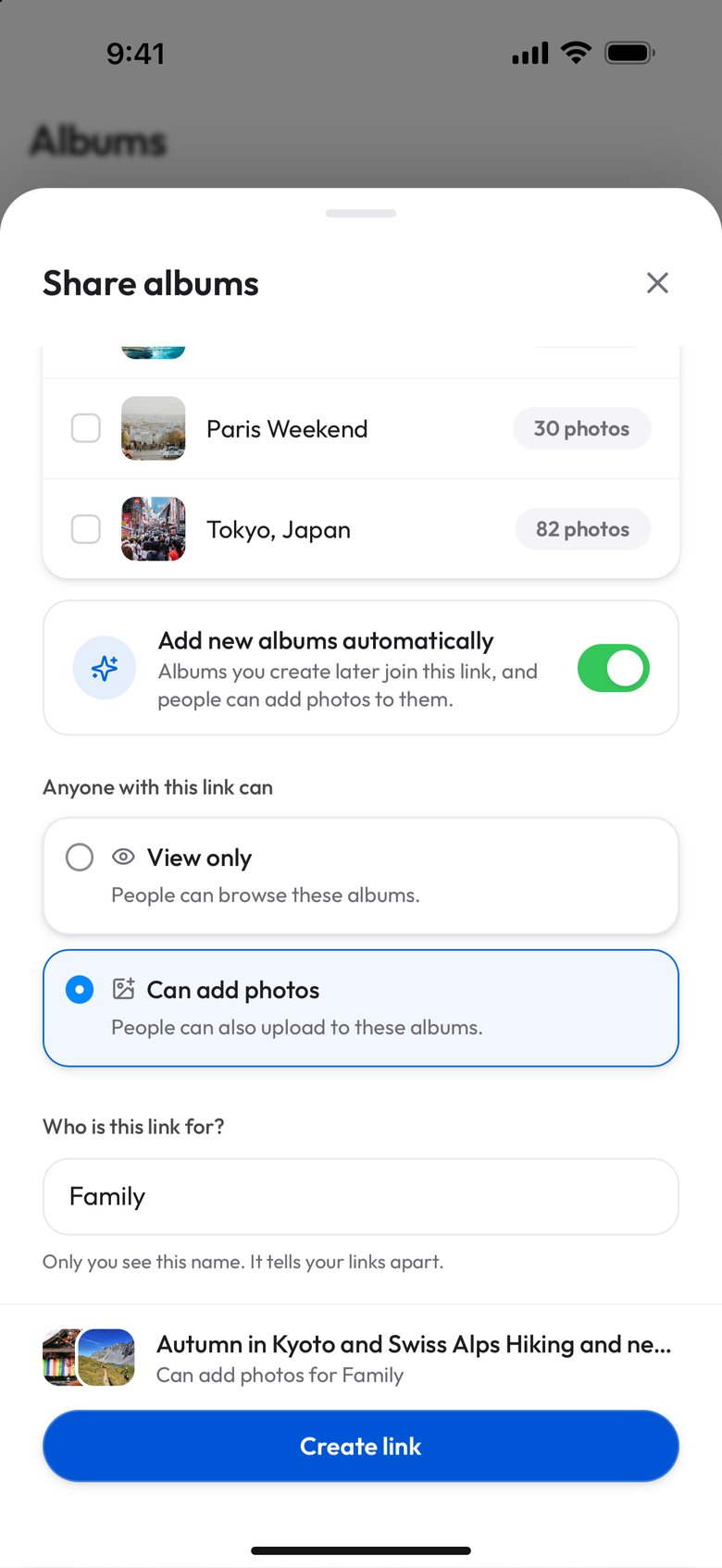
- Open your Albums page, tap Share at the top right next to New Album, and choose Share albums.
- Pick the albums this link should open. A contribute link needs at least one, and albums you create afterward join it only if you leave the Add new albums automatically switch on.
- Choose Can add photos instead of the default View only. The modal restates what the link will do in plain English before you create it.
- Name the link under "Who is this link for?" if you are going to make several - Sarah, Grandma, Work. Only you see the name, and it is what makes the list readable later.
- Create the link, then copy the address or download the QR as a print-ready PNG and put it wherever people will be.
What your guest does: they open the link, tap an album, tap Add photos, and choose images from their camera roll. There is no account step, no app install and no name field anywhere on that path. Files can be up to 500 MB each, and they are stored as the original, not a resized copy.
You do not have to sit and watch it happen. When people add photos through a contribute link, Viallo emails you and sends a push notification, batched rather than one ping per photo, and the count reflects photos that are still there rather than upload attempts. Every link you make with Share albums is listed in Settings under Profile sharing with its own view count, and revoking one stops it immediately, including an upload already in progress.
On cost: curated links, the QR and guest upload work on the free plan, which is 2 albums, 200 photos and 10 GB. There is no per-event fee and no guest cap. What bounds a collection is the owner's storage plan, because guest uploads are billed to the owner rather than to the guest. If you want the behavioral half of this - how to get people to actually send their photos once the link is out - that is covered in how to actually get people to contribute.
Can You Add People to a Shared Album If You Are Not the Owner?
On Google Photos, yes. On Viallo, no. On iCloud Shared Albums, only if the owner of an upgraded album allows it. The confusion is worth clearing up because adding a photo and adding a person are separate powers: a contributor can put pictures in, and whether a member can also bring people in is a separate rule that each platform sets on its own.
| Platform | Can a member add photos? | Can a member add people? | How the audience actually widens |
|---|---|---|---|
| Google Photos shared album | Yes, if the owner allowed it | Yes, anyone with access to the album | A member adds people directly or forwards the link; the owner hears of it only with notifications on |
| iCloud Shared Albums | Yes, if the owner allowed it | Only if the owner of an upgraded album allows it | The owner invites; on an album upgraded in iOS 27, the owner can let participants invite others with a link |
| Dropbox file request | Yes, with no account at all | No, there is nobody to add | The request link is forwarded; uploads land in a folder that is private by default |
| Viallo | Yes, on a contributor link | No, links are the owner's to create | Only by forwarding a link the owner already made |
Apple puts the choice with the owner: its upgrade page says that on an upgraded album "you can also allow participants to manage the album, invite others with a link, and more", and on iOS 26 it is the album's creator who adds participants. Google Photos is the loosest: its help page on shared album controls says that anyone with access to the album can add others, and Google Photos tells the owner only if notifications are on. Turning off Collaborate does not change that: the same page describes it as the switch that prevents others from adding photos. Viallo is the strict one by design: a share link can only be created by the album's owner, at any permission level, so a contributor cannot mint a second link. What a holder can always do, everywhere, is forward the link they were given.
That last point is the one that matters when you are deciding what to send. A link is a capability rather than an invitation to one person, so the practical question is not whether someone can add people, it is what the link does if it travels. The two things worth setting before it goes out are what the link lets a holder change and whether you can pull it back afterward, both covered in the two ways to limit access to an album.
So when you are not the owner and someone else wants in, the route depends on how the album reached you. If it came as a link, forward the link, and check which link it is first, because the next person gets exactly the access it carries. If it is a Google Photos album, add the person yourself from the album's share options, and tell the owner, who sees it only with notifications on. If it is an iCloud Shared Album, ask the owner, who either invites the person or, on an upgraded album, lets participants invite with a link. And if you are the owner and keep getting asked, send one link to the group rather than an invitation per person, so each of those requests becomes somebody forwarding a message.
How was this checked?
On 26 October 2026 we fetched the help, pricing and home pages of the ten upload surfaces in the first table, 22 pages in all, with curl and Python's standard library, and recorded for each value the exact sentence on the vendor's page that supports it. A cell reads not stated where the pages read do not say; nothing was filled in from memory, and no upload was tried on any service. The results are in dataset.csv, and check.py fetches every page again and reports whether each supporting sentence is still there.
Frequently Asked Questions
What is the best way to collect photos from guests who do not have an account?
Send a link built for uploads rather than a platform album. A Viallo contribute link asks the guest for nothing, not even a name, and keeps photos at the resolution they were uploaded at. On the help pages read on 26 October 2026, Guestlense and Kululu took a guest's photos with nothing typed by default, GUESTPIX, Lense and Eventphoto.io asked for a name, and Dropbox file requests may prompt for a name and an email address.
How do I let someone add photos to my album without an account?
In Viallo, open the Albums page, tap Share, choose Share albums, select the albums the link should open, and switch the permission from View only to Can add photos. Copy the link or download its QR code as a PNG and send it. Recipients open it in any browser and upload straight away. In Google Photos the equivalent is the Collaborate setting, which Google says lets anyone who has the link add photos.
Is it safe to let anyone with a link upload to my album?
It is as safe as the scope of the link, and scope is the control that matters. A Viallo contribute link only ever reaches the albums the owner selected, plus albums created later if the owner leaves Add new albums automatically on, and it never opens an album left off it - so the worst case is unwanted photos in the albums on the link rather than in the rest of the library. Photos arriving through a contribute link are not screened when they are uploaded, so the protection is being able to revoke the link, which takes effect immediately. Treat the address itself as the credential, send it to the group you mean to reach, and revoke it if it travels further than you intended.
What is the difference between a view link and a contribute link?
A view link lets people browse the albums it covers, and can cover your entire library including albums you create later. A contribute link also lets them add photos, and has one extra rule: it must name at least one album. It opens only the albums it names, and albums created afterward join it only while the Add new albums automatically switch is on. Google Photos draws a similar line with its Collaborate setting: with it off, nobody else can add photos.
Can my guests add photos if they do not have a Google or Apple account?
Yes, through a link built for uploads. Google's help page says anyone who has the link can add photos while Collaborate is on, without saying whether they must sign in. Apple says that since iOS 27, released on 14 September 2026, friends and family can contribute on the web without an Apple Account, but only to an album created or upgraded for it. A Viallo contribute link needs neither and works on the free plan, with no per-event fee and no cap on how many people use the link; Guestlense, by comparison, charges a one-time 49 dollars.