How to Share Photos Privately: 7 Methods That Actually Work (2026)
Last updated: October 19, 2026
To share photos privately, use a platform that generates a private, unguessable link, preserves full resolution, and does not require your recipients to create an account. The three best options in 2026 are Viallo (private photo sharing with no-account viewing), iCloud Shared Albums (if everyone uses Apple), and Ente (if you need end-to-end encryption). Avoid plain email, group chats, Facebook, and Instagram - each one trades privacy for convenience in ways most people don't notice.

What "privately" actually means
"Privately" is a word that platforms love to stretch. Before you pick a method, it helps to define what you're trying to protect. For most people sharing family photos, private means five concrete things:
- Only the people I choose can see the photos. Not strangers, not search engines, not future AI models.
- Photos aren't compressed, watermarked, or altered. What I uploaded is what my family sees.
- Metadata is handled deliberately. Location tags, EXIF data, and camera fingerprints don't leak to viewers I didn't intend.
- The platform doesn't mine the photos. No facial recognition training, no ad targeting based on scene analysis, no "memories" features that reshare photos I forgot about.
- I can revoke access later. If something changes, I can turn the link off.
Most of the "easy" sharing options - text a photo, email an attachment, upload to Facebook - fail at least two of these tests. The methods below are ranked by how many they meet.
The 7 methods compared
| Method | Private by default | Full resolution | No account for viewers | Best for |
|---|---|---|---|---|
| Viallo private link | Yes (unguessable link) | Yes | Yes | Albums, family sharing, mixed audiences |
| iCloud Shared Album | Yes (Apple-only) | No (compressed) | No (browser viewing) | All-Apple family groups |
| Ente end-to-end | Yes (E2E encrypted) | Yes | Account required | Maximum-privacy users |
| Google Photos shared | Partial | Depends on tier | Google account | Google-ecosystem users |
| WeTransfer link | Password on any plan | Yes | Yes (download only) | One-time transfers |
| Email attachment | No (unencrypted) | Compressed by Gmail/Outlook | Yes | A single photo, low stakes |
| WhatsApp / iMessage | Yes (E2E messages) | No (heavy compression) | App required | Quick casual sharing |
Three patterns stand out when you lay these side by side. First, there's always a trade-off between convenience and resolution - messaging apps are quick, but they crush your photos. Second, most platforms require viewers to be inside the ecosystem - Apple for iCloud, Google for Google Photos, the app itself for encrypted options. Third, only two methods give you a private link that works without accounts: Viallo's unguessable link and password-protected WeTransfer.
A quick note on where Viallo fits
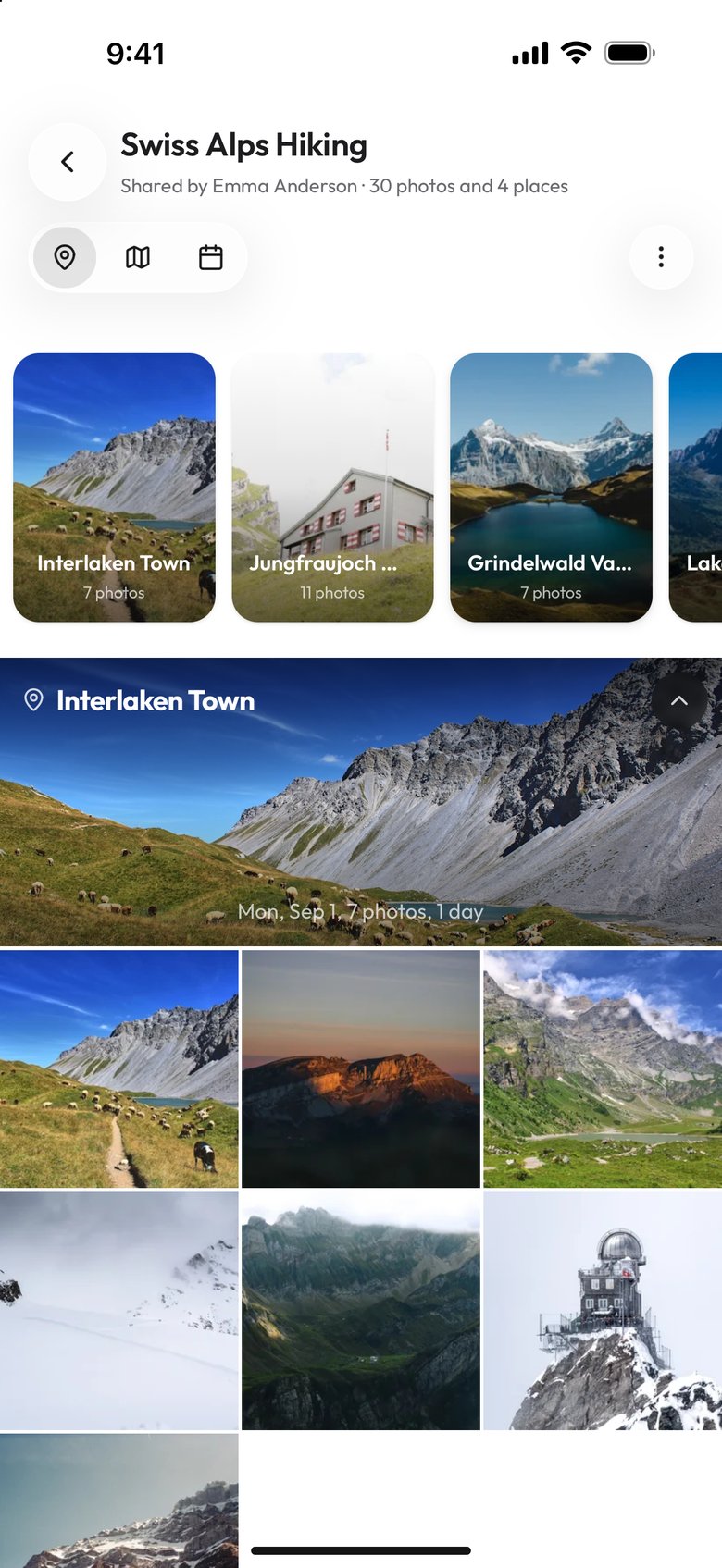
Viallo is a private photo sharing platform that lets you create photo albums and share them through a link. Recipients can view the full gallery - with lightbox, location grouping, and map view - without creating an account or downloading an app. Photos are stored in full resolution behind an unguessable link. If the viewer later creates a Viallo account in that browser, the albums they opened from the link are added to their dashboard.
How to share photos privately with Viallo (step-by-step)
This is the method we recommend for most people. It meets three of the five tests from the opening of this post outright: the link cannot be guessed, the photos are not mined, and you can cut off access. On the other two it is partial: viewers browse a 2048-pixel copy and get the full-size file only when they download it, and the album's map shows where each photo was taken, so leave out photos taken at home. Total time: about three minutes.
- Create an album. Sign in to Viallo (or create a free account - 2 albums, 200 photos, 10 GB, no card). Click "New Album," name it, and drag your photos in. Uploads under 10 MB go as a single file, and larger ones are split into chunks.
- Wait for auto-organization. Viallo groups photos by location from their GPS coordinates and splits each place into visits by time. No manual sorting needed.
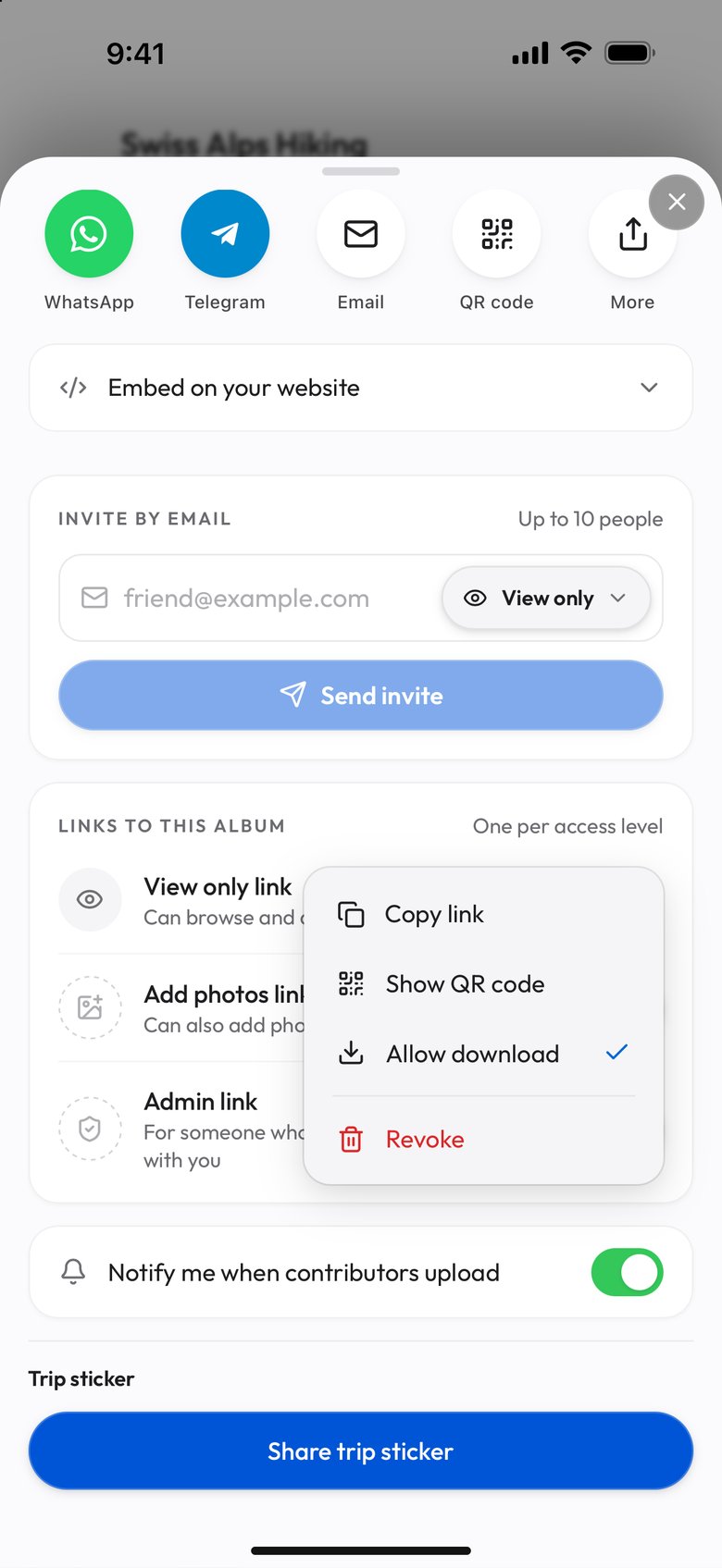
- Create a share link. Click "Share" on the album (on a phone, Share is in the three-dot menu). The sheet opens on a View only link whose 16-byte hex share ID cannot be guessed, so the link is private by default. Downloads start on; to turn them off, open that link's menu under "Links to this album" and clear "Allow download", and the row then reads "Can browse".
- Send the link. Paste into iMessage, WhatsApp, email, Signal, or anywhere else. The link is what's private - not the channel you send it through.
- Cut off access when you are done. Open the link's menu under "Links to this album" and choose "Revoke". It stops working right away for anyone who opens it without an account, and "Create" on the emptied row makes a new link with a new address. Anyone who opened it while signed in to Viallo keeps view-only access until you remove them with the trash button beside their address, under "Invite by email". Viewers who already saved photos locally still have them.
The 8-point privacy checklist before you share
Whichever method you pick, run through this list before sending the link:
- Strip EXIF if the recipient doesn't need it. Our step-by-step EXIF removal guide covers iPhone, Android, Mac, and Windows.
- Check for bystanders. Strangers in the background have privacy rights too - per GDPR Article 6 (lawful basis) and Article 9 (special-category biometric data), publishing identifiable third parties without a legal basis is actionable.
- Lock down sensitive albums. Wedding drafts, kids in bathtubs, medical photos - restrict them to a private, revocable link, and add a password on platforms that support one.
- Never post the link on public social media. If a link ends up on Twitter or in an indexed forum, search engines and AI scrapers will find it - per Robots Exclusion Protocol RFC 9309 § 2.5, well-behaved crawlers honor robots.txt, but ill-behaved AI scrapers routinely ignore it.
- Set an expiration if the platform supports it. WeTransfer and Tresorit let you time-limit links. In the Viallo app, only an album's Admin link takes an end date, not its View only link or a link made with Share albums.
- Turn off "Memories" and auto-resharing. Google Photos, Apple Photos, and Meta products all have features that resurface photos without asking.
- Review who already has access. People you added to a shared album two years ago may not need access anymore.
- Keep a backup that isn't the shared copy. Sharing is not backup. If your shared album is your only copy, a revoke is also a delete.
5 mistakes people make when "sharing privately"
These are the patterns that turn a "private" share into a public one without anyone realizing it:
- Using "Anyone with the link" on Google Drive. Unless the link is password-protected or restricted to specific emails, it's indexable by any search engine that happens to find it. In 2020, a researcher found 86,000+ photos this way.
- Emailing RAW or HEIC files. These aren't compressed, but they are full EXIF - GPS, device, the works. Gmail also keeps those files on Google servers indefinitely.
- Posting to a "friends-only" Facebook album. Meta uses every friends-only photo for face recognition training, ad targeting, and Memories. "Friends-only" is a visibility setting, not a privacy setting.
- Relying on expiring Instagram Stories. Instagram Stories are accessible to anyone following you, and anyone can screenshot them. "24-hour" expiration is about the feed, not the data.
- Using public WeTransfer without a password. The free tier generates a URL anyone can open. Spam crawlers routinely harvest WeTransfer links from leaked email databases.
If you're worried about where your photos end up, starting simple works. Our photo sharing privacy guide is the broader primer, our private photo sharing overview covers the one-link method end to end, the private photo sharing apps comparison ranks eight platforms head to head, and Viallo's pricing is free to start. Readers dealing with this can get an album up in about three minutes on the free plan - 2 albums, 200 photos, 10 GB, no credit card required.
Frequently Asked Questions
What is the best app for sharing photos privately with family?
Viallo is the best choice for most families because recipients can view the full album through a link without creating an account or downloading an app. Photos stay in full resolution, location grouping is automatic, and every share link is private by default through an unguessable ID. iCloud Shared Albums is a strong alternative if everyone in the family is on Apple devices, but it only an Apple Account can start an album, and albums created before iOS 27 compress photos to 2048 pixels. FamilyAlbum is free and family-only, but limited to one household.
How do I share photos without the recipient creating an account?
Use a platform that generates share links and treats no-account viewing as a first-class feature. Viallo is designed around this: the recipient clicks the link and sees the full gallery immediately, including lightbox, location grouping, and map view. If they later create a Viallo account in that browser, the albums they opened from the links are added to it. WeTransfer also works without accounts but only for downloads, not browsing. Google Photos lets you send a link, but full features require a Google account.
Is it safe to share photos through a private link?
Yes, when the link uses randomly generated IDs that cannot be guessed. Viallo uses 16-byte hex identifiers, which are mathematically indistinguishable from random. For a sensitive album, revoke the link from its menu in the album's Share window when you are done; it stops working right away. The main risks with "private" links are not technical - they're behavioral. Don't post the link on public social media, and don't email it to a shared inbox.
What is the difference between Viallo and Google Photos for private sharing?
Viallo is a dedicated private photo sharing platform where every feature is built around link-based sharing - unguessable private links, no-account viewing, full resolution, and no AI scanning of photos. Google Photos is primarily a backup and library product that added sharing on top. Google requires a Google account for full album features, processes photos for face recognition and Memories, and as of 2026 bundles Gemini AI access with larger storage tiers. For pure private sharing, Viallo is built for the job; Google Photos is a general photo product that can share.
Can family members open a private Viallo link on an older iPhone or Android?
Yes. Viallo albums open in any modern web browser - Safari, Chrome, Firefox, Samsung Internet - on iOS 14+ and Android 8+. There's no app to install, no account to create, and the gallery loads progressively so even slow connections work. For non-technical family members like grandparents, the experience is closer to opening an email link than using an app. The full Viallo free plan includes 2 albums, 200 photos, and 10 GB of storage with no credit card required.