View-Only Photo Sharing: What Turning Off Downloads Does
Last updated: October 19, 2026
Most people who want a view-only album assume view only means nobody can keep the photos. In Viallo it means nobody can add to them. The link the Share window hands out is View only, and adding photos takes a second link, which you get by switching the pill to Add photos. Saving is a separate switch on the View only link: Allow download in that link's menu starts on, and clearing it takes the download options away. Even with downloads off, nothing stops a screenshot. That is the honest ceiling on every product in this category, and anyone selling you more than that is selling you a feeling.
Check Which Link You Are About to Send
This is worth checking before anything else, because it surprises people. The link the Share window makes the first time you open it on a Viallo album is View only. Beside Anyone with the link sits a pill that switches to Add photos, and that is a second link with its own address, one that lets people upload. On an album whose first link was an Add photos link, the window opens on that one instead. Nothing is wrong with that link - it is the right one for a wedding, a hike, a family reunion, anywhere the point is that other people contribute. But it is not the setting most people picture when they say they want to "just send someone the photos".
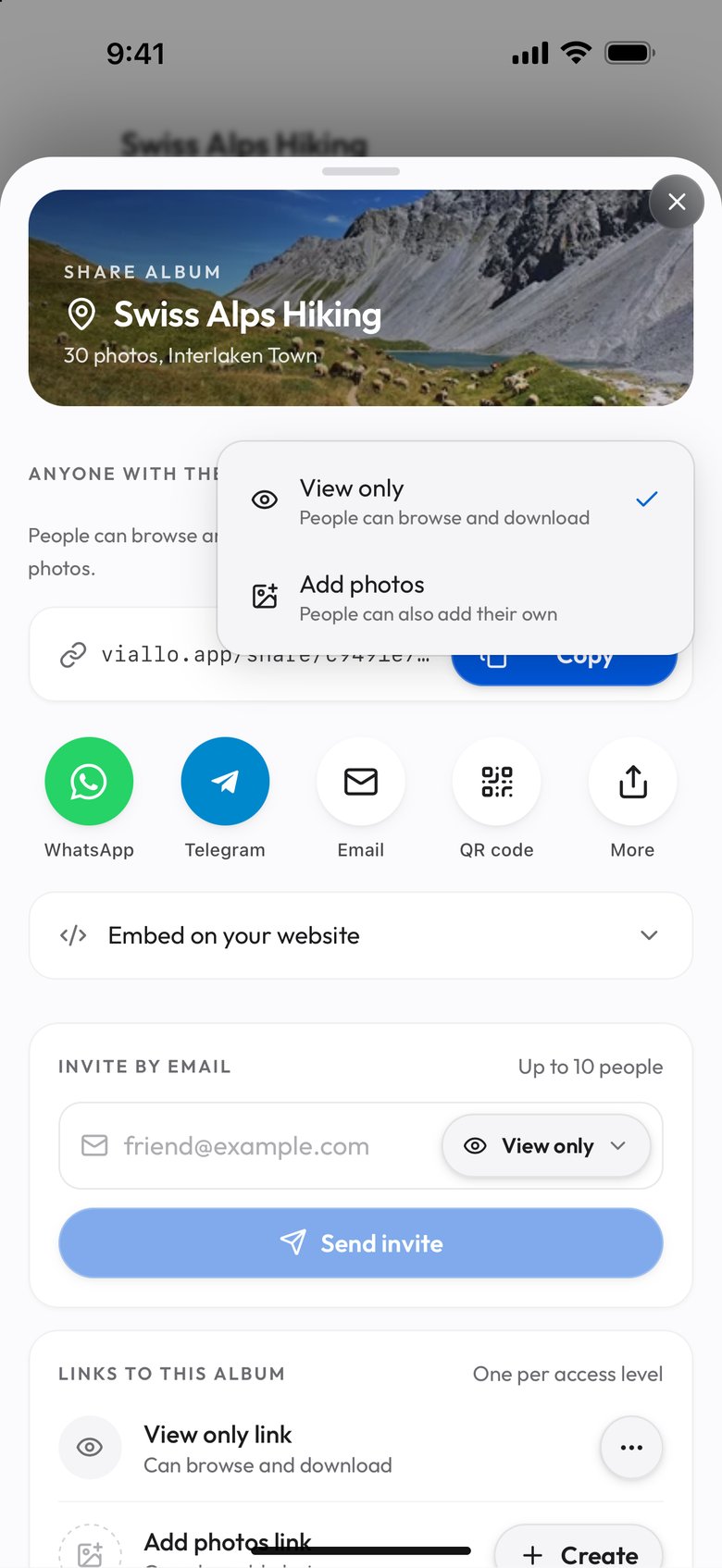
An Add photos link means the person on the other end can upload into your album. Their photos land next to yours, and the album stops being a thing you made and becomes a thing the group is making. If that is not what you wanted, switch the pill back to View only before you copy the link. There is no prompt that asks.
What View Only Actually Changes
One thing, and it is worth being exact about it because people constantly assume it is two.
It is upload. A View only link cannot put anything into the album. The person can open it, scroll it, look at the map and, while Allow download is on for it, save what they like, and that is the end of their permissions.
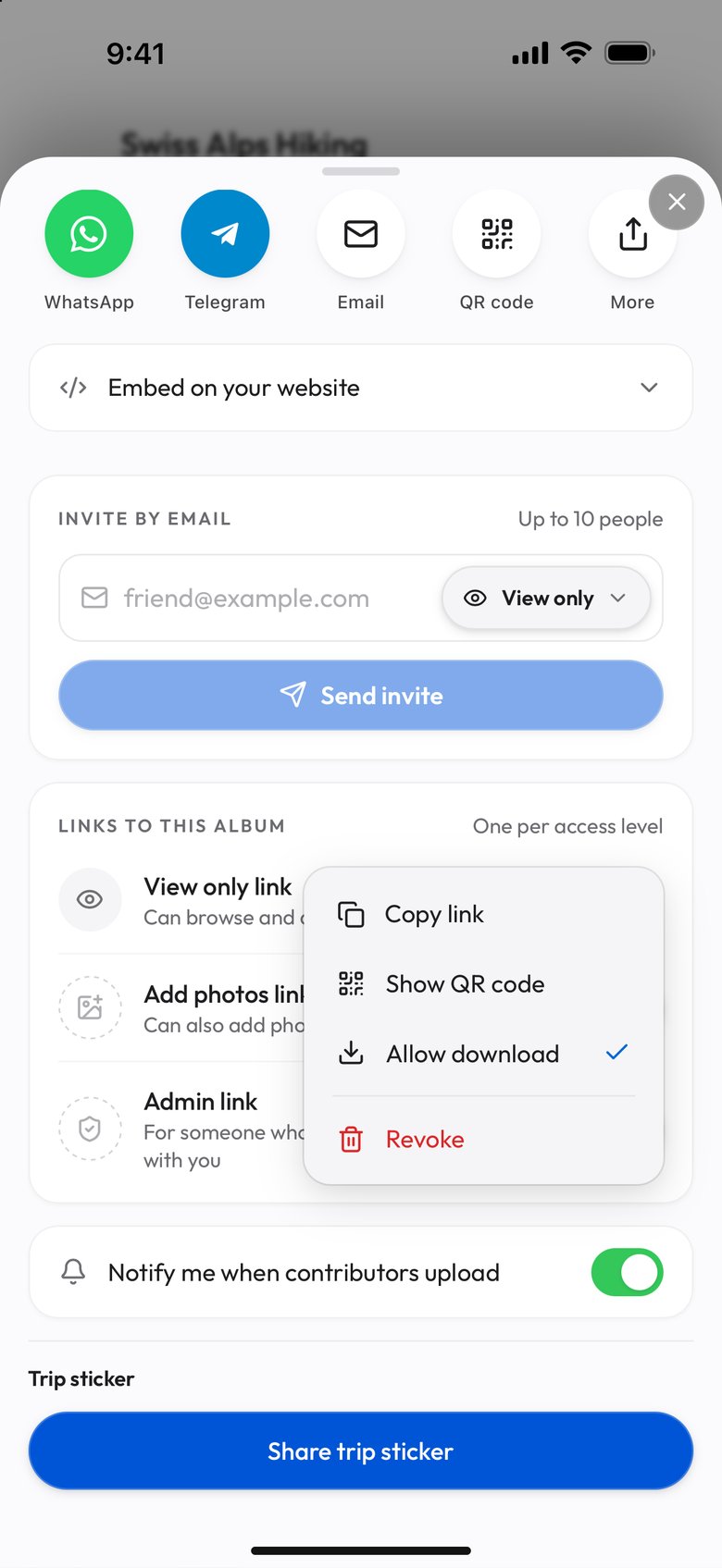
What it does not change is the one people are actually asking about: downloads. Those are a second switch on the same link. Allow download starts on, so someone holding a new View only link can save the photos at full size exactly like someone you invited to add their own. The combination many people want, a link to look at and not keep, is the View only link with Allow download cleared: its row under Links to this album then reads Can browse, and the people holding it get no download option.
Viallo is a private photo sharing platform, and the part of it that matters here is that viewers never make an account. The link opens in a browser, on a phone that has never heard of the product. That is the reason the permission on the link carries so much weight: the link is the entire access model. There is no account on the other side to attach a setting to, so everything you want to be true about what that person can do has to be true of the link itself.
What Turning Downloads Off Does Not Do
Clearing Allow download hides the download options, and it blocks the right-click menu on the photo grid. A photo opened full screen can still be saved with a right-click, but what that saves is the 2048-pixel display copy, not your original. That is a real change and it covers the case that actually happens - a relative who would have tapped save without thinking about it now has no download option to tap. Leave the switch on, which is how every View only link starts, and that relative can still save.
It does not stop a screenshot. It does not stop someone photographing their own monitor. The photos are still being sent to their device, because that is what looking at a photo on the internet is, and no amount of interface can undo that. If your requirement is that a specific person must never end up with a copy of a specific image, no link-sharing product solves it - not this one, not Pixieset, not SmugMug. Do not send the photo.
The useful way to hold this: downloads-off is a fence, not a vault. It changes the default behavior of ordinary people, which is most of what you needed. For anything time-bound, a link that stops working is a better lever than downloads; here is what actually happens when a shared link expires.
Which Platforms Let You Share Without Letting People Save
Consumer photo products mostly do not offer this at all. It has historically been a professional-photography feature, sold to people delivering proofs to clients, which is why the tools that have it best are the ones nobody uses for family photos.
| Platform | Can you turn downloads off? | Does the viewer need an account? |
|---|---|---|
| Viallo | Yes - clear Allow download in the View only link's menu | No |
| Google Photos | No - anyone with the link can save | No, to view |
| iCloud Shared Albums | No - viewers can save what they see | Apple Account to contribute |
| No, and photos are compressed on the way in | Yes, a phone number on the app | |
| WeTransfer | No - downloading is the entire product | No |
| SmugMug, Pixieset | Yes, built for client proofing | No, but priced for professionals |
For a family album you want people to look at and not file away, the other consumer rows give you no download switch. A Viallo View only link promises that nobody holding it can add photos, and with Allow download cleared it also hides the download options. If you need proofing tools, or you are delivering paid work, the professional galleries are the right tool, and the comparison written for photographers goes through them properly.
Setting It Up
- Open the album and press Share (on a phone, Share is in the ⋮ menu).
- Look at the pill beside Anyone with the link. If it reads Add photos, open it and choose View only. Each choice is its own link, so switching does not change a link you already sent.
- Under Links to this album, open the menu on the View only link. Leave Allow download ticked if you want people to keep what they open, or clear it if you want them only to look; the row then reads Can browse. The switch belongs to the link, so it also reaches people you have already sent it to.
- Press Copy, or one of the share buttons under the address, and send it however you like. Nothing is installed on the other end.
When Not To Bother
Most of the time. If you are sending holiday photos to your parents, the thing you want is for them to be able to keep the ones they like, and turning downloads off is a small act of rudeness dressed up as a privacy setting. The setting earns its place in a narrower set of cases - photos of other people's children in a class album, a portfolio you are showing but not licensing, anything going to a wider circle than you can name.
If your concern is the audience rather than what they can do with the file, the ways to send photos to someone without an account and how to share photos privately are the more useful places to start.
Frequently Asked Questions
What is the best way to share photos that people can view but not download?
Use a link-sharing product that puts a download switch on the link itself. SmugMug and Pixieset offer that control with proofing tools, at professional pricing. On Viallo, open the album's Share window and, under Links to this album, clear Allow download in the View only link's menu: viewers still open it in a browser without signing up, and they get no download option.
How do I stop people saving photos from a Google Photos album?
You cannot. Google Photos has no setting that removes download or save from a shared album, so anyone with the link can keep a copy. The nearest control is to stop sharing the album entirely, which removes it for everyone at once. If you need a middle setting, you need a different platform.
Is view-only sharing actually private?
It is private in the sense that matters for most people: the album is not indexed, not public, and reachable only by the link you sent. Viallo does not scan the photos or train on them. It is not end-to-end encrypted, so if your threat model includes the hosting provider itself, this is not the product for that.
What is the difference between a view-only link and a private album?
A private album is about who can reach it; a view-only link is about what they can do once they have. The two are set separately, and a private album shared with a link set to Add photos is still an album that other people can upload into. Check which link you sent, not just the album.
So can they screenshot it anyway?
Yes, and there is no product that prevents it. Turning downloads off changes what happens by default, not what is possible - it stops the casual save, which is the thing that actually occurs. If a specific image must never be copied by a specific person, the only reliable control is not sending it to them.