How to Find Out Who Uploaded Which Photo
Last updated: October 18, 2026
Start with the export rather than the screen. GUESTPIX is the clearest case in this category: its download arrives as full-resolution photos already sorted into folders by guest name. Apple Shared Albums track contribution per item, since subscribers can delete only what they personally added. Google Photos documents no per-item attribution at all. When the service records nothing, the photo's own camera model and timestamp are the fallback.

Why This Turns Out to Matter
Nobody wonders who uploaded a photo out of curiosity. The question arrives attached to a job: you want the original file at full size for a print, you want to know whether the person in it is happy for you to post it, or something is in the album that should not be and you need to ask one person rather than forty.
All three of those need a name, and the name is the thing most shared albums quietly do not give you. A tile in a grid looks identical whether the service recorded its provenance or threw it away. The five steps below are the order that actually works, cheapest first.
Step 1: Find Out Whether the Service Records It
This determines everything that follows, and it takes two minutes. Read from the vendor's help pages, not the product page. Below is what four services documented as of 3 September 2026.
| Service | Records who added each item? | Survives the export? |
|---|---|---|
| GUESTPIX | Yes, per guest name | Yes, the ZIP is organized by guest name |
| Apple Shared Albums | Yes, per contributor | Not published |
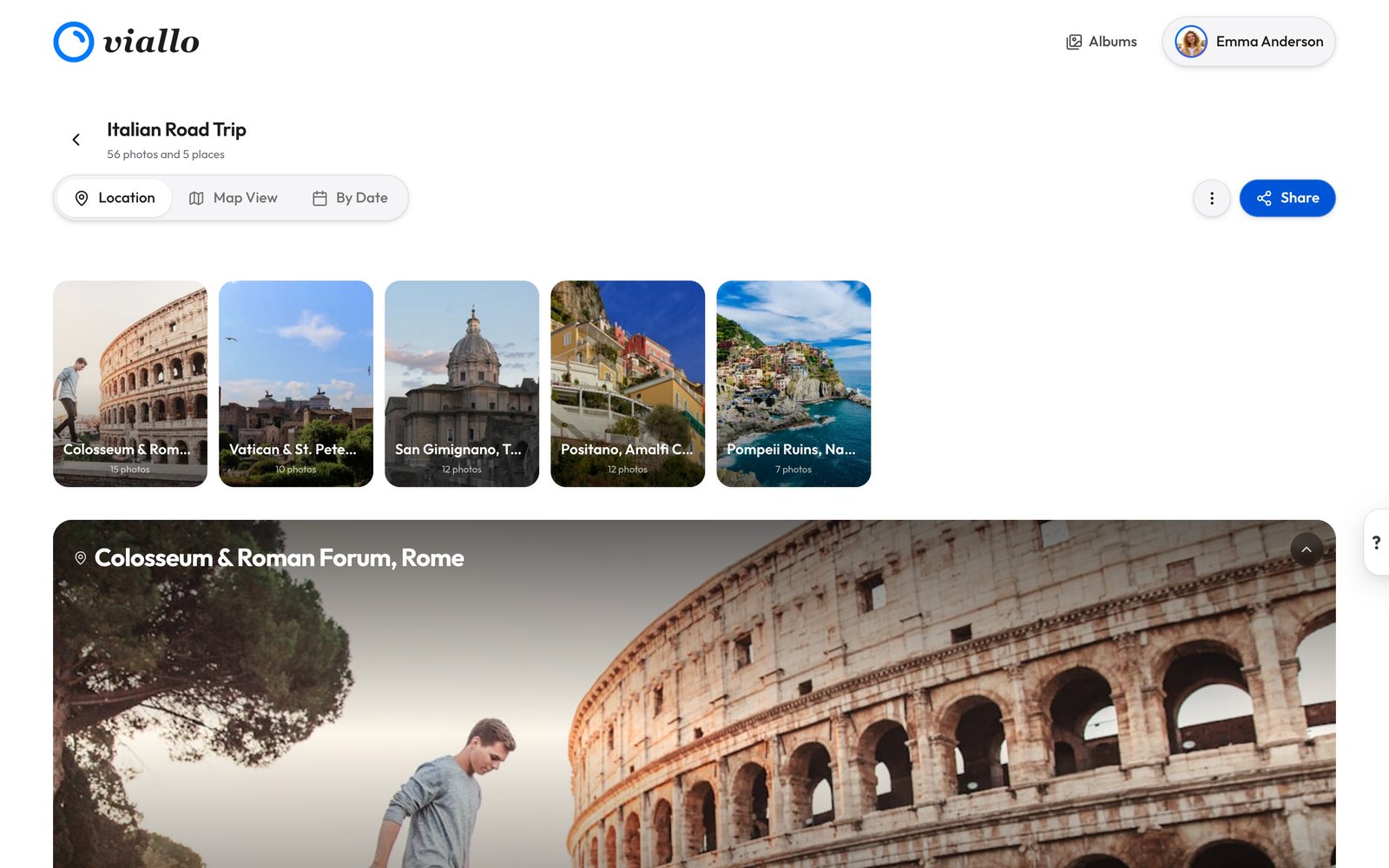
| Viallo | By share link only, never by person, and no screen shows it | No, provenance is not written into the download |
| Google Photos | Not published | Not published |
Apple's entry is inferred from a sentence in its documentation rather than from a feature description: "If you're a subscriber, you can delete anything that you personally added." A service cannot scope deletion that way without knowing who added what, so the record exists even where the interface is quiet about it.
Google's entry is the honest kind of blank. Google's help pages describe who can view and who can add to a shared album, and say nothing anywhere about per-item contributor attribution, so the accurate answer is not published rather than no.
Step 2: Ask for the Export, Not the Screen
Attribution that only exists in an interface is attribution you cannot use. What you want is for it to survive the download, and one service in this category does that outstandingly well.
GUESTPIX's bulk download arrives with full-resolution photos organized by guest name plus a CSV of the guestbook messages. That is the whole problem solved at the file-system level: the folder names are the answer, and they stay the answer after the gallery is deleted.
Where an export offers no such structure, do the sorting yourself while the interface still shows you something. Download in batches, one contributor at a time if the album lets you filter that way, and name the folders as you go. It is dull and it takes twenty minutes, which is twenty minutes better than reconstructing it from memory next year.
Do not confuse this with face search. EventPixel's PixelFind on its mid-tier plans finds the photos a given person appears in, which is a genuinely useful feature and a different question from who pressed upload.

Step 3: Read the File's Own Metadata
When the service records nothing, the photo often records enough. A camera model plus a timestamp narrows a wedding to one person surprisingly reliably, because there is usually exactly one Pixel 7a in the room.
- On a Mac, open the file in Preview and press Command-I, then look at the Exif tab for Make, Model and the capture date.
- On Windows, right-click, choose Properties, then Details, and read Camera maker and Camera model.
- On an iPhone or Android phone, open the photo in the gallery app and swipe up or tap the information button.
Two caveats. Metadata identifies a device, not a person, so a shared family iPad tells you very little. And plenty of services strip or rewrite this on the way in, especially anything that recompresses, so an empty Exif panel is as likely to be the platform's doing as the photographer's.
Viallo reads the camera, lens, aperture, shutter, focal length and capture time out of each file it receives and keeps them alongside the photo, and it uses the capture location to group the album into places. That is the useful side of storing files at full resolution with no compression applied: keeping the original rather than a re-encode is also what keeps its metadata intact.
Step 4: Use the Contributor List Instead of the Tile
This is the step people skip, and often the one that answers the question fastest. You rarely need to know which of forty people added photo 219. You need to know who the four contributors were, so you can ask the right one.
Viallo is a private photo sharing platform that takes this position deliberately, and it is worth describing exactly rather than generously. Every uploaded photo carries the share link it arrived through, and that binding is what scopes permissions: anyone holding a contribute link can manage every photo that came in through that link, whoever uploaded it, and no others, an admin link can manage anything, and a view-only link can manage nothing. No person is recorded, signed in or not: an upload through a link stores the link and nothing else, and no screen in the album shows that marker, the owner's included.
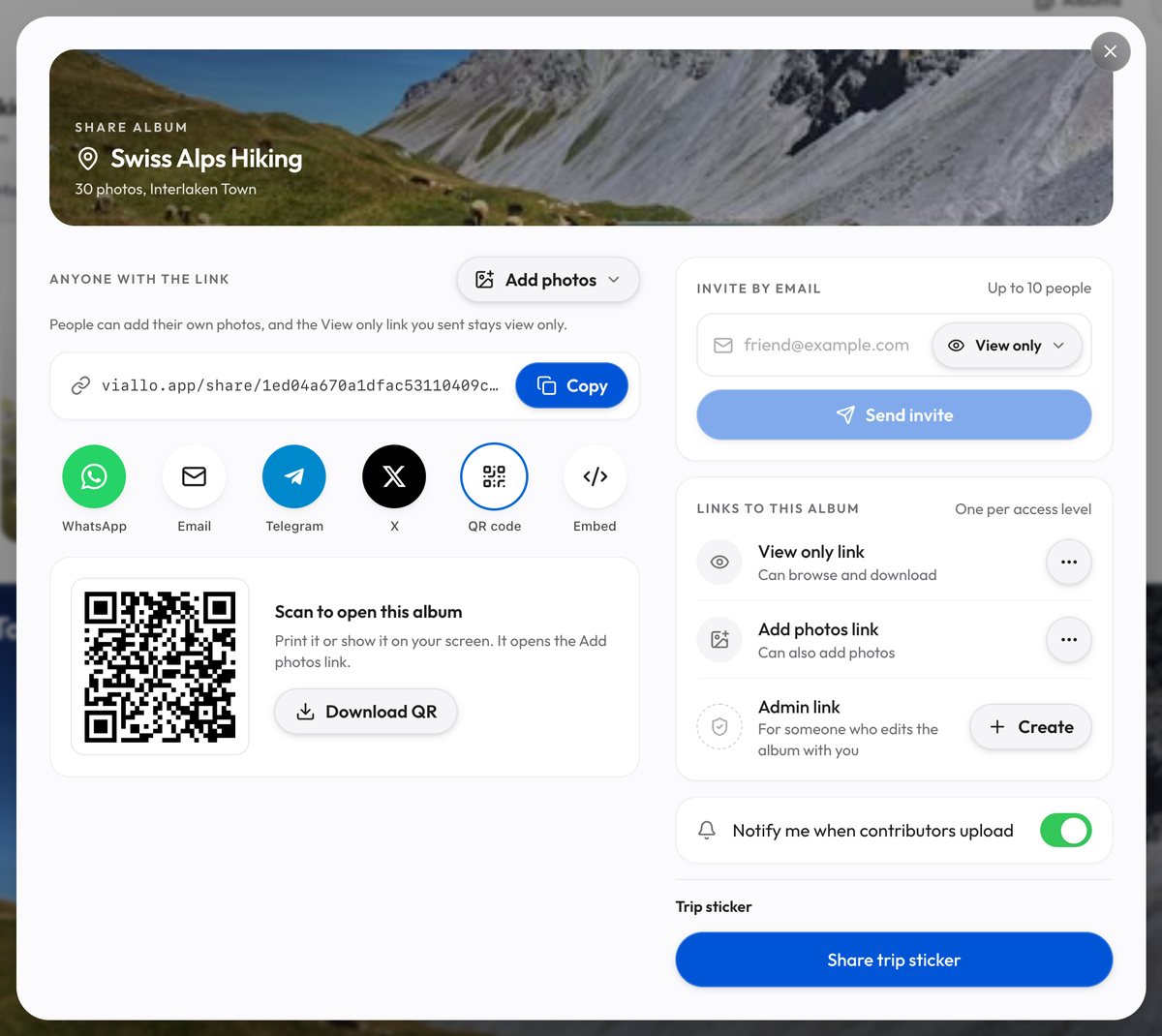
So the honest description is that Viallo records which link a photo came through and spends it on permissions rather than on labels. The album's Share sheet lists the people who signed in through a link or were invited by email, by email address, but nothing ties any of them to a photo. Guests who arrive through a link have no account and therefore no name to show.
That is a real limitation if your job is per-photo forensics, and the right trade if your job is not handing every viewer a roster of everyone else's identities. Who ends up holding a photo once it has been viewed is the other half of the same question.

Step 5: Set It Up Before the Event, Not After
Everything above is recovery. The cheap version is a decision made before anyone uploads anything, and it costs nothing.
Know that a Viallo album will not sort uploads by link
One link per table, per family or per side of the wedding does not sort anything inside one Viallo album. Its Share sheet holds one Add photos link, and although the Profile sharing page can make more links that add photos to the same album, no screen shows which link a photo came through. If the groups need to stay apart, they need separate albums.
Prefer named sharing where it is available
A no-account link is the right tool for a guest who will upload once. For the four people who will add hundreds of photos over a year, a service that ties uploads to an account, such as Apple Shared Albums, keeps a record per person. On Viallo an email invite as Contribute does let that person upload, but through the album's Add photos link, so their uploads are recorded against that link rather than against them.
Do the export early
Pull the download while the gallery is still live and the attribution is still attached. Every service in this category eventually closes something, and attribution is usually the first thing to be lost rather than the photos themselves.
If the underlying worry is who is allowed to do what with a photo rather than who added it, who actually owns a photo you upload is the piece to read next.
Frequently Asked Questions
What is the best way to keep track of who contributed which photos at an event?
Use a service that writes it into the export, and GUESTPIX is the clearest example here because its download arrives with full-resolution photos already organized by guest name. Viallo cannot do this: an upload through a link carries no name, and no screen shows which link a photo came through, so groups that must stay apart need albums of their own. Either beats trying to reconstruct it from a grid of tiles afterward.
How do I find out who added a photo to a shared album?
Open the album's member or contributor list first, because narrowing forty viewers down to four contributors is usually enough to know who to ask. If the service scopes deletion by contributor, as Apple Shared Albums do, the record exists even where no name is displayed. When nothing in the interface helps, download the file and read its camera make, model and capture time, which frequently identifies the device and therefore the person.
Is it private to show every viewer who uploaded what?
Not entirely, which is why some services do not. Labeling each tile with a name tells everyone holding the link who else is in the album, and Viallo records no contributor identity at all. The trade is real in both directions: Apple Shared Albums let subscribers delete what they personally added, which requires the album to track it, and that tracking is what makes the courtesy possible.
What is the difference between attribution and face recognition?
Attribution records who pressed upload; face recognition finds who is visible in the frame. EventPixel's PixelFind, on its mid-tier plans and above, does the second one, and it will happily return a photo of you that somebody else added. If your job is getting the original file, you need attribution, because the person in the photo usually does not have it.
Someone put a photo in our family album that shouldn't be there. How do I work out who?
Check the contributor list against the timestamp before anything else, since the photo was almost certainly added in a batch and the batch narrows it to one person. If the album was shared by a Viallo link, the album will not tell you: it records which link a photo came through but shows that to nobody. Delete the photo as the owner, which is quicker than a conversation about it.