No Account Needed to View: So Who Is Actually Keeping the Photos?
Last updated: October 20, 2026
A link that opens with no account is the best way to get photos in front of someone and the worst way to leave photos with them, and those are two different jobs. An account is a gate at the door, but it is also a shelf the photos sit on afterward. Take away the gate and you take away the shelf, so a recipient who never signed up has no library, no backup and no second copy: their entire claim on those photos is one message sitting in one inbox. That is a good trade, as long as you know what it makes you. It makes you the archive. Send the link, and keep the originals somewhere you control, because "they have seen the photos" and "they have the photos" are not the same sentence.
Who Is Holding the Photos When Nobody Signed Up
You are. That is the whole answer, and almost nobody says it out loud when they are selling no-account sharing.
The rest of this cluster of questions is well covered. Whether a viewer needs an account to look is settled, and so is whether a guest needs one to add photos back. Both of those are about the first click. This is about the ten years after it, which almost nothing written about no-account sharing bothers with, and which is where people are actually surprised.
Here is the surprise in one line: the person you shared with does not have a copy. They have an address. Those behave completely differently over time, and confusing them is how families end up discovering, four years later, that the only surviving version of a set of photos was on a phone that went in a river.
An Account Is Two Things and You Only Wanted to Remove One
Think about what an account actually does in a photo product. It does two unrelated jobs that happen to be sold as one thing.
- It is a gate. It decides who is allowed in. This is the part everyone complains about, correctly, because it is the part that stops a seventy-year-old from seeing pictures of her own grandchildren.
- It is a shelf. It is the place the photos sit once they arrive: a library that is searchable, that survives a new phone, that the person can walk back into next year without needing to find the original message.
When you send a no-account link you are deliberately removing the gate, which is the right call for almost every real situation. But no product ships a shelf without a gate, because the shelf is defined by whose it is. So the shelf leaves with the gate, and the recipient ends up in an odd position: full access, no possession.
This is not a flaw in link sharing. It is what link sharing is. A link is a pointer to something you are keeping. It was never a delivery of something they now own, and the reason that distinction gets lost is that on the day you send it, both look identical to everyone involved.
Copy or Pointer: What Each Method Leaves Behind
Every way of sending photos to someone lands in one of two categories, and the category decides everything about what happens later. It is worth sorting whatever you use into the right column before you decide it is handled.
| What you sent | What lands on their side | Survives a new phone? | Depends on you? |
|---|---|---|---|
| Photos in a messaging app | A copy, usually compressed | Only if they migrate the chat history | No |
| Email attachments | A copy, size capped | Yes, as long as the mailbox lives | No |
| A cloud storage link | A pointer to your folder | Only the message carrying it | Yes, entirely |
| A gallery link with no account | A pointer to your album | Only the message carrying it | Yes, entirely |
| A shared album they joined | A shelf inside their own account | Yes | Partly |
Read the last column. The two methods that require nothing of the recipient are also the two that depend most completely on the sender, and that trade is exactly backwards from how it feels. The easy option puts the whole burden on you. The annoying option, the one where they have to sign up for something, is the only one that gives them anything durable of their own.
Neither column is wrong. It is a question of which failure you would rather have: a relative who never sees the photos because she could not get past a login screen, or a relative who saw them, loved them, and cannot find them again in 2031. The first failure is immediate and obvious. The second is silent, which is why it is the more common one.
The Four Ways a Received Link Actually Goes Missing
Worth separating from the question of whether the link itself dies. Platform expiry policies are a real and separate problem, and they are the one people plan for. These four are the ones that get you when the link is perfectly alive and still unreachable.
- The message is gone. The thread was cleared, the group chat was left, the app was reinstalled. The link was in the message and nowhere else, so the link is gone with it, no matter how permanent the album is.
- The message is there and unfindable. This is the common one. Four years of messages, no memorable words in the one that mattered, and no idea what month it was sent. A link with no title is very hard to search for.
- The device changed. A new phone that did not carry the history over, or a work laptop that was handed back. The account you removed would have been the thing that followed them across the move.
- Nobody thought to ask you again. The quietest one. People do not want to bother the sender twice for the same thing, and a surprising number of people will simply decide the photos are lost rather than send a message asking.
Not one of those is a product failure, and no feature fixes them. They are what happens when the only handle a person has on something is a single message in a stream of thousands.
You Are the Archive, So Act Like One
Once you accept that the recipient is holding a pointer rather than a copy, one thing follows: the quality of your own storage is the quality of everyone's. There is no second copy out there quietly backing you up. Whatever you have is what exists.
That raises the stakes on things that look like minor preferences when you are only thinking about the next few weeks.
- Resolution is not recoverable. If the version you keep has been through a round of app compression, that is the version that exists now. Viallo stores photos at full resolution without recompressing them, which matters far more when your copy is the only copy.
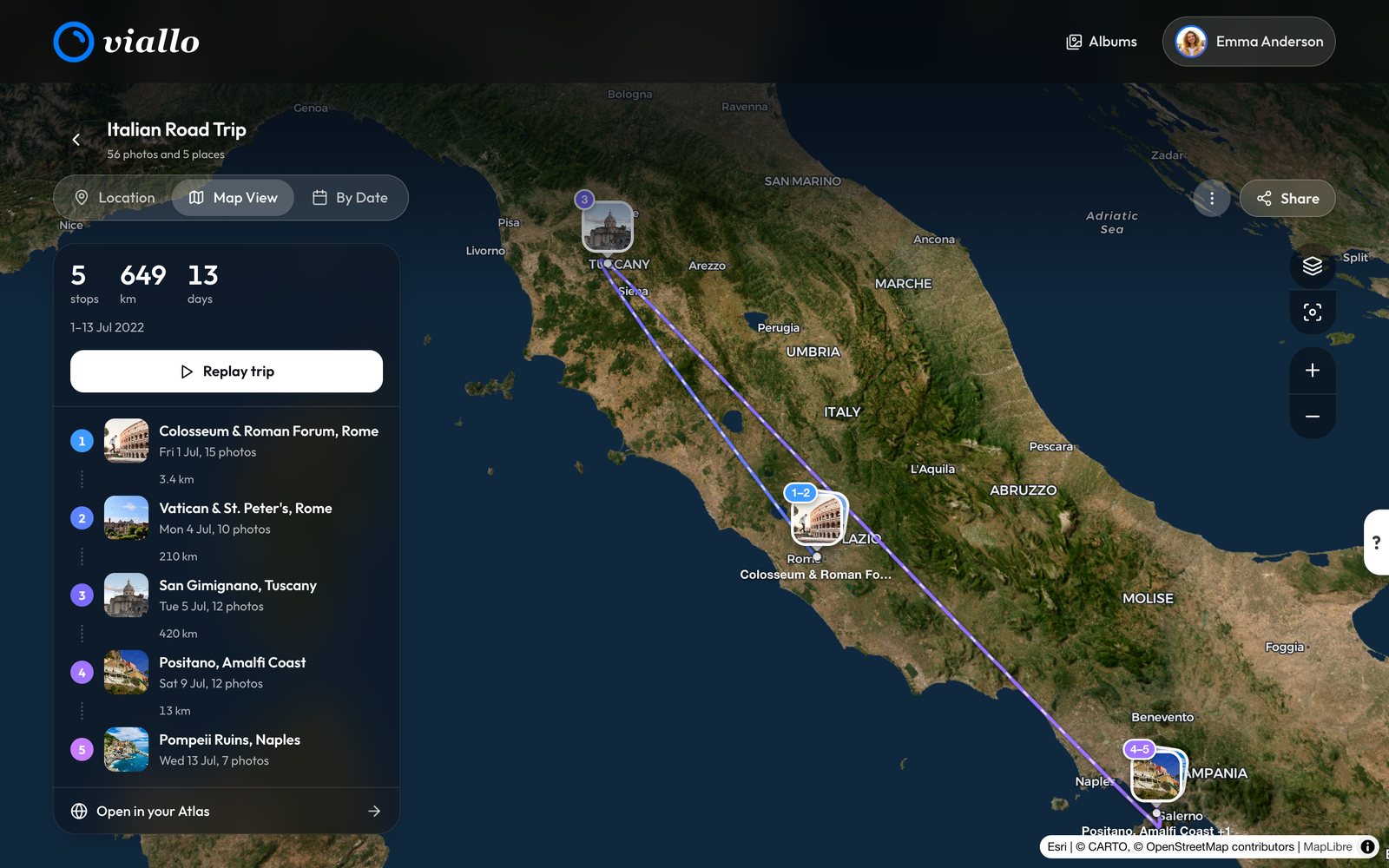
- Findability is not optional. An archive nobody can search is a shoebox. Automatic grouping by location and a map view are how you answer "the summer we were at the lake" four years later, which is the only way anyone ever actually asks.
- The terms matter more than they seem. Where the photos are hosted and what is done to them is a real question when you are the last line. Viallo does not scan photos or train AI on them.
None of that replaces your own backups. If the photos are irreplaceable, they belong in more than one place regardless of who you share them with, and the three copies rule is still the honest answer to that. Sharing is not backup, and no sharing product should claim otherwise.
The Extreme Version: A Capsule That Lands in a Decade
Everything above gets sharper the longer the gap, which is why a time capsule is the clearest version of the problem. On delivery day, photos land in front of someone who has no account, was not expecting them, and may have no way to contact the sender. The recipient needing no account is what makes that possible at all. It is also what leaves them holding a link and nothing else on the most emotionally loaded delivery they will ever get.
A few things about a Viallo capsule are worth knowing in that specific light, because they are about what happens after it opens rather than before.
- No timer deletes it. Nothing removes a delivered capsule after a set number of years, so the link is not the thing that expires first. It does not follow that the recipient will still be able to find the message carrying it.
- The recipient cannot reply. The capsule builder has no reply option, so every capsule arrives with no way to respond. That is a fine choice for some messages and the wrong one for others.
- There is no recall button. No screen in the app lets you withdraw a sealed capsule, before the delivery date or after it. Once it is sealed, treat it as sent, exactly like an email.
- Delivery failure is recorded, not hidden. It is retried, and a permanent failure is written down rather than silently dropped. That protects you from believing something arrived when it did not.
The alternatives have the same shape with worse numbers. Gmail's scheduled send has no published maximum window and caps attachments by size, which at least leaves a real copy on the other side. FutureMe sends a letter to your future self, and its own editor says to"Upgrade to Premium to include images, videos, and files." A cloud storage share link is live the moment you make it, so there is no delivery date to speak of. The trade-offs are covered properly in scheduling photos to arrive years from now.
Five Things That Actually Help
None of these are product features. They are habits, they take about a minute each, and they are the difference between photos someone saw once and photos someone still has.
- Say what the link is when you send it. One line of text next to it, with a place and a year in it. This single thing does more for findability four years later than anything else on this list, because it makes the message searchable.
- Tell them to save the ones they care about. Most people do not think to, because opening a gallery feels like receiving. Check what your tool allows on the recipient side before you assume it, and say the sentence out loud when you send the link rather than hoping they work it out.
- Send it somewhere durable for anything that matters. Email survives phone changes and app migrations better than any chat thread. For a birthday album, the group chat is fine. For the photos from a funeral, it is not.
- Re-send once, later, without being asked. A year on. It costs nothing, it lands on a device that probably is not the one from last time, and it is the cheapest form of redundancy available to you.
- Keep your own copy properly. You are the archive whether you meant to be or not, so the originals need to be somewhere you would trust with the only copy. Because that is what it is.
When None of This Applies
Most photo sharing is disposable and should be treated that way. Photos from a night out, a dinner, a work trip: nobody is archiving those, nobody will miss them in 2032, and adding ceremony to them is a waste of your evening. Send the link, let it rot in the thread, move on. The trade that makes a no-account link so easy is exactly right when nothing is at stake.
The distinction is whether the photos could be taken again. A weekend can be repeated. A child at four cannot, a grandparent's last summer cannot, and a wedding cannot. For that much smaller pile, the question of who is actually holding them is worth two minutes of your attention, and the answer is going to be you.
Frequently Asked Questions
If someone views my photos through a link without an account, do they have a copy?
No. They have an address that points at your album. Nothing is stored on their side and they have no library holding it, so if the message carrying the link is lost, their route back to the photos is asking you again.
Is a no-account link a backup for the people I share with?
It is the opposite of one. Sharing by link makes your copy the single point of failure for everyone, so it raises the importance of your own backups rather than reducing it. Treat sharing and backup as two separate jobs.
Should I make people create an account so they keep the photos?
Usually no, because the account requirement is what stops people from ever seeing the photos in the first place, and a photo nobody opens is worth less than a photo they cannot re-find. The better fix is to describe the link when you send it and re-send it once a year later.
What happens to a time capsule the recipient opens and then loses?
Nothing deletes a delivered capsule after a set number of years, so the storage side is not what fails first. What fails is the recipient finding the delivery message again, which is a reason to tell them to save what matters to them on the day it lands.
Can the recipient reply to a capsule they received?
No. The capsule builder has no reply option, so every capsule is a one-way message. If you want it to start a conversation, put a way to reach you in the message itself.