Sharing a Photo Album When Half the Group Is on a Laptop
Last updated: October 19, 2026
Sharing an album with a mixed group is a screen problem before it is anything else, and the person on a laptop is the one who gets left out. WhatsApp has no recipient who does not also have a phone account. AirDrop cannot reach a Windows machine. The platforms that do have a website usually put a sign-in in front of it, which is a much larger ask on a desktop than on a phone where the app is already logged in. A browser link is the only format that lands the same way on a 27 inch monitor and a 6 inch screen, because there is nothing to install on either end. A Viallo album opens in a browser with no account for the person viewing it. What a link does not fix by itself is layout, so open your own link on a big screen before you send it to someone who only has one.

The Group Is Never All on the Same Screen
You send one link to twelve people after a weekend away. Eight of them open it on a phone within the hour. The other four open it on a computer, or try to, and you hear about it later, usually as a question rather than a complaint.
The four are predictable once you look at who they are. A parent who checks things at a desk in the evening. An aunt whose "computer" is the household laptop in the kitchen and whose phone is for calls. Someone at work with ten minutes and no interest in installing anything on a machine they do not own. A relative who genuinely does not have a smartphone, which is a smaller group every year and still not an empty one.
The reason this keeps going wrong is that you tested it on your own phone. You made the album on a phone, you sent the link from a phone, and you checked it on a phone. Everything worked. The desktop half of your audience is the half you never see, so the failure is silent: they do not tell you the gallery was unusable, they just stop opening the links.
The Methods With No Desktop Path at All
Some of the most common ways to move photos are not bad on a big screen. They simply have no big screen version, and that is worth separating from the ones that merely look wrong.
- WhatsApp is a phone account with a desktop mirror. WhatsApp Web and the desktop app both hang off an account that lives on a phone. There is no way to be a WhatsApp recipient without a smartphone running WhatsApp, so a relative with only a computer cannot receive the album at all. Everyone else gets it compressed, which is a separate problem.
- iMessage does not run on Windows. On a Mac it is fine. On a Windows laptop, which is most laptops, there is nothing to open. Sending an album through Messages quietly assumes everyone is inside one hardware ecosystem.
- AirDrop and Quick Share are for the same room. They move files between devices standing next to each other. They are not a way to show photos to someone in another city, on any screen, and they do not cross between iPhone and Android either.
- Anything that opens with "get the app". An app install is an inconvenience on a phone and an impossibility on a locked-down work laptop or a shared family computer. The desktop viewer does not get a worse version of the experience, they get no version of it.
The honest framing is that most of these were never meant to be albums. They are message channels, and a message channel assumes the recipient carries the same device you do.
What a Phone-First Gallery Does on a Laptop
The second failure is softer and easier to miss, because the link does open. It just opens badly, and the person on the other end assumes they are doing something wrong.
A gallery designed only for a phone tends to break in the same four ways when a browser window is 2000 pixels wide instead of 400.
- A single tall column becomes an endless scroll. A display that could comfortably show thirty photos at once shows four, and a set of ninety photos turns into several minutes of wheel spinning. The screen is bigger and the album somehow feels longer.
- Thumb-sized controls become mouse targets. Buttons spaced for a thumb are oddly enormous with a cursor, and the swipe gesture that advances to the next photo has no mouse equivalent unless someone built one.
- The arrow keys do nothing. Every desktop user tries them in a photo viewer. When nothing happens, the gallery starts to feel like a website rather than a set of pictures, and people leave earlier than they otherwise would.
- Getting a copy is unclear. Desktop viewers behave differently from phone viewers. They save files, they print one for a frame, they attach a shot to an email. On a phone the equivalent is a long press and a screenshot, which is why senders rarely notice this is missing.
None of that is exotic engineering. It is just work that only pays off for an audience the person building the gallery may not have pictured.
Why the Sign-In Wall Is Worse on a Laptop
The third failure is the account requirement, and it is unevenly distributed in a way most people never think about. On a phone the account you are being asked for usually already exists, is already signed in, and unlocks with a face. On a desktop the same requirement means typing a password from memory.
Then it gets worse in ways specific to the machine. The two factor code arrives on a phone that may be in another room. The household computer is shared, so signing in means either signing a family member out or leaving your account signed in on a machine other people use. A work laptop may block the sign-in entirely. And the recovery flow, when the password turns out to be wrong, ends in an inbox that person checks on their phone, which they now have to go and find.
Stack those against a phone user who taps a link and is already authenticated, and the same account requirement costs one group nothing and the other group ten minutes. This is compounded by who tends to be on a desktop in the first place: the same relatives who, for entirely reasonable reasons of their own, will not create another account for anything.
Where the Desktop Half Actually Lands
Read this as a column about the viewer rather than about the sender. The question is not what the method can do, it is what it asks of the person sitting at a computer who just wants to see the pictures.
| Method | Is there a desktop path? | What it costs the viewer |
|---|---|---|
| Only as a mirror of a phone account | A smartphone they may not have, plus compression | |
| iMessage | Mac only | Nothing to open on Windows |
| AirDrop / Quick Share | No | Being in the same room as the sender |
| An app-first sharing service | Sometimes, often gated | An install, or a sign-in on a shared machine |
| Cloud storage folder | Yes, in the browser | A file list instead of a gallery |
| Email attachments | Yes, everywhere | A handful of photos per message |
| A browser share link | Yes, same address as the phone | Nothing to install and nothing to join |
The bottom two rows are the only ones where the desktop viewer is not being asked for something the phone viewer already had. Email clears that bar and then fails on volume, which leaves one shape that works for a group split across screens.
What a Browser Link Solves, and What It Does Not
A link is device-agnostic for a structural reason rather than a clever one: there is no membership to belong to and no client to install, so the same address does the same job in Safari on a phone, Chrome on a Windows laptop and Firefox on a fifteen year old desktop. A Viallo album opens in a browser with no account for the person viewing it, which is the entire cross-device argument in one clause. It is also why app-free sharing methods keep coming back to links, and why a photo capsule delivered years from now uses the same format: you cannot know what the recipient will be holding, so you send something that does not care.
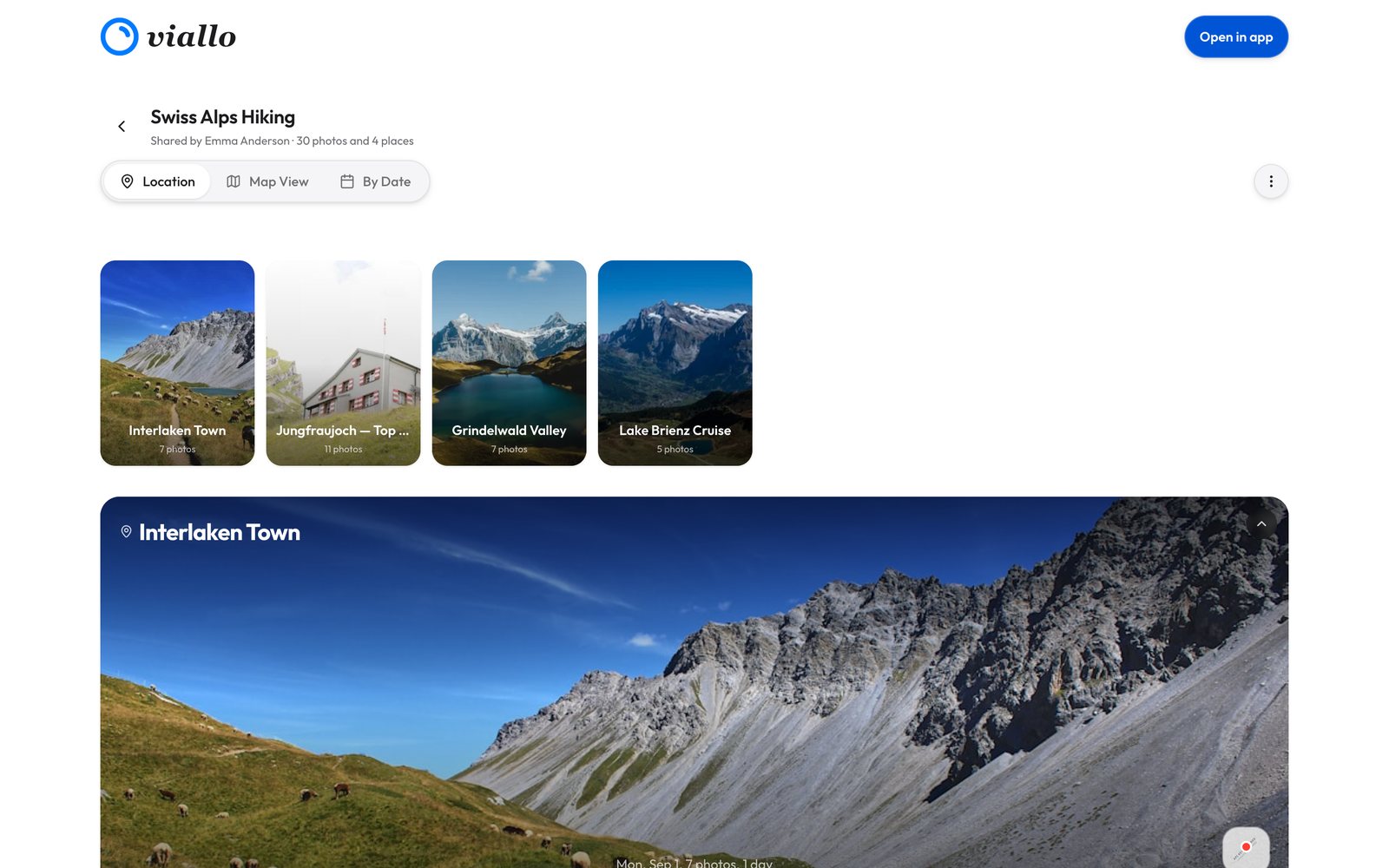
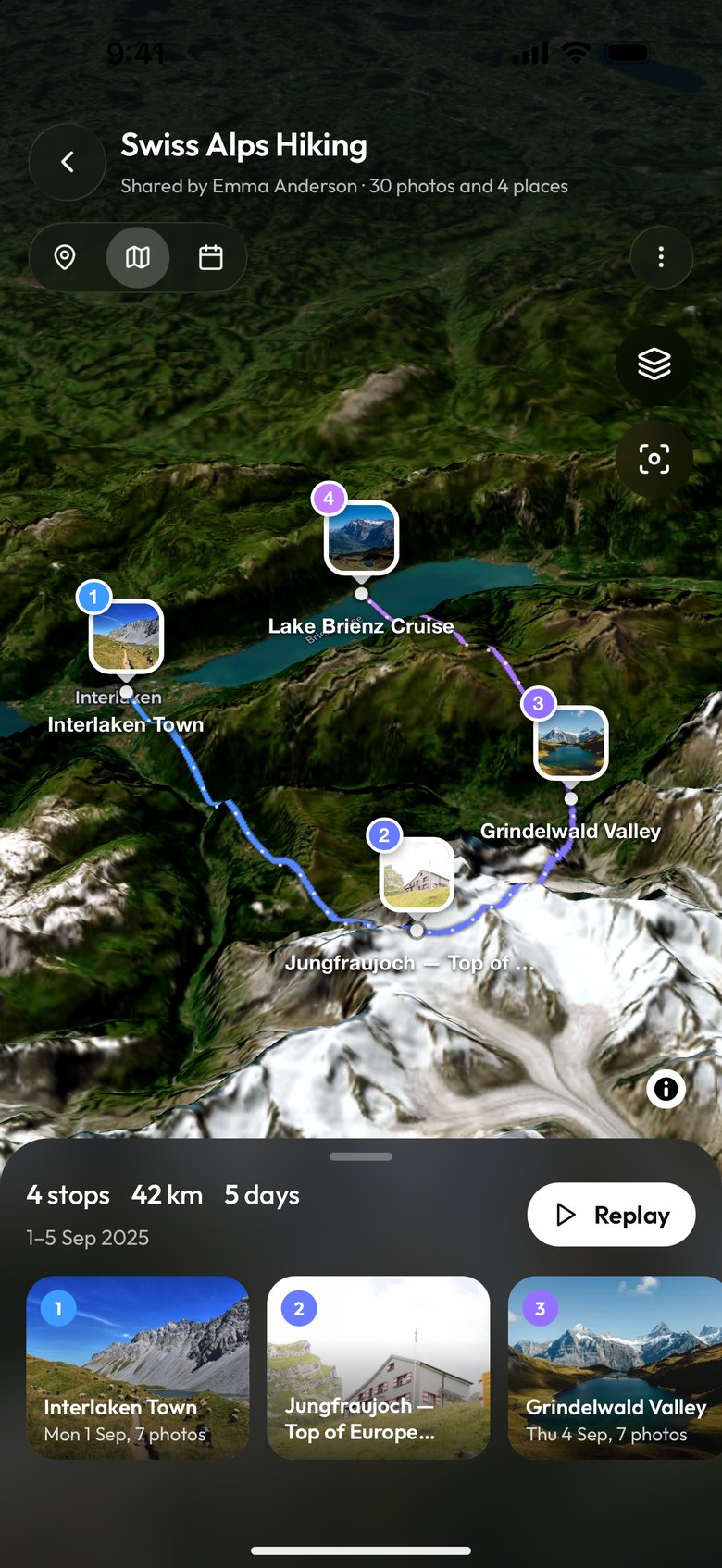
Two more things are worth naming. A viewer browses a 2048 pixel copy of each photo, which looks fine at 6 inches and can look soft at 27, so a desktop viewer who wants the full file should download it: the original arrives that way. And photos carrying GPS data are grouped by location with a map view, which is a different kind of thing to browse than a flat grid.
The limits are just as worth stating. A link is the credential, so anyone holding it can open it, which is the trade you accept in exchange for nobody having to sign in. A link does not make a layout good on its own, so the desktop rendering is still a thing to check rather than assume. And the desktop viewer still needs a working connection and a browser from this decade, which covers almost everyone but not literally everyone.
Test It on the Other Screen Before You Send It
This takes two minutes and is the only reliable way to find out what the other half of your group sees, because they will not tell you.
- Open your own link on a computer, full width. Not on your phone. Count how many photos fit on one screen and decide whether that is a gallery or a scroll.
- Press the arrow keys inside a photo. If nothing moves, the person using a mouse is going to be hunting for a small target on every single image.
- Drag the window narrow, then wide. A layout that only has one good width will have picked the wrong one for somebody in your group.
- Try to get one photo out of it. Whatever the desktop equivalent of "save this to show my sister" is, find out whether it exists before someone asks you for it.
- Send it to one desktop person first. Pick the least patient one. If it works for them, the rest of the group is fine.
If a method fails any of these badly enough, the answer is usually not to explain it over the phone. It is to put the photos somewhere that opens in a browser and send the same address to everybody.
Frequently Asked Questions
How do I share a photo album with people on both a computer and a phone?
Send one browser link rather than choosing a platform. A link has no client to install and no membership to join, so the same address opens on a Windows laptop, a Mac, an Android phone and an iPhone. A Viallo album opens in a browser with no account for the person viewing it, which is what keeps the desktop half of the group from being asked for more than the phone half.
Why can't my relative see the album on their computer?
Usually because the method you used is a phone product. WhatsApp requires a phone account even to use its desktop mirror, iMessage does not exist on Windows, and AirDrop only works between Apple devices in the same room. If the person has no smartphone, none of those can reach them at any quality.
Does a shared album need an account on desktop?
It depends entirely on the service, and this is the question worth asking first. A Viallo album needs no account from the person viewing it on any device. Where a sign-in is required, it costs a desktop viewer far more than a phone viewer, because the phone is already signed in and the laptop means a typed password and a code sent to a phone in another room.
Do photos look better on a big screen than on a phone?
They show their flaws more. Compression that is invisible on a 6 inch screen is obvious at 27 inches, which is why a service that recompresses uploads is a worse deal for desktop viewers than for phone viewers. Viallo keeps the uploaded file, but a viewer browses a 2048 pixel copy of each photo and gets the original by downloading it.
How can I check what the desktop version looks like before I send it?
Open your own share link on a computer at full window width, press the arrow keys inside a photo, then drag the window narrow and wide again. Two minutes of that finds every layout problem your desktop viewers were never going to mention to you.