Viallo in 24 Languages: What Is Translated
Last updated: October 20, 2026
Viallo, a private photo sharing platform, runs in 24 languages, from Czech and Polish to Greek, Japanese and both forms of Chinese. You pick one under Settings, Language, it follows your account to every device, and the settings screens offer your phone's own language when it is one Viallo speaks. Your albums, the Share window, the Atlas, the map and nearly every email Viallo sends you follow that choice. People you share with see an album in their own language when they are signed in to an account, and in English when they open the link as a guest.
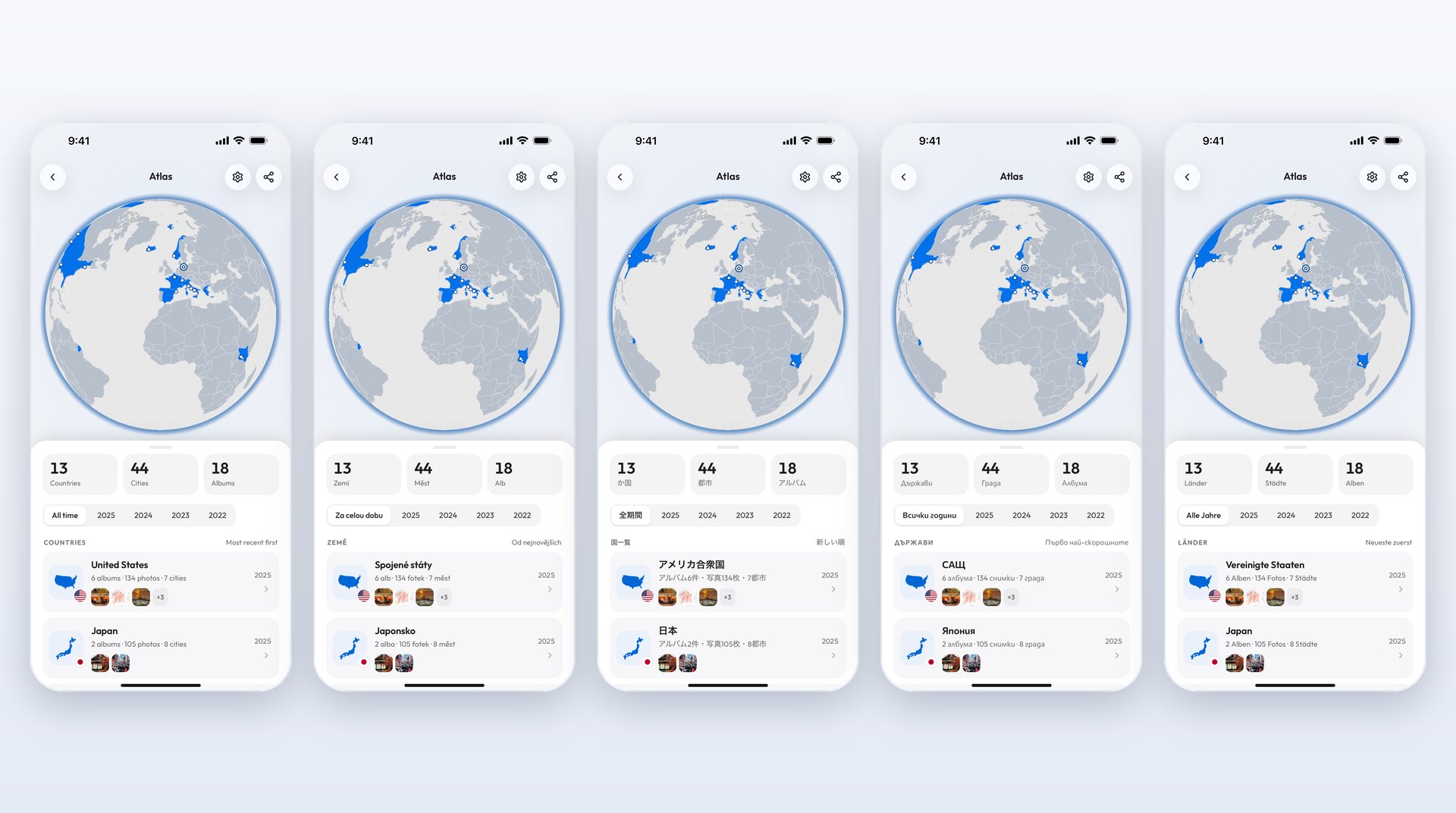
Every family has someone who does the uploading: a grandmother in Brno who uploads photos of the grandchildren every Sunday, an uncle in Porto Alegre who collects everyone's pictures after a wedding. Viallo runs in their own language, so neither of them has to remember where the buttons are.
The 24 languages
English, French, German, Dutch, Italian, Spanish, Polish, Czech, Slovak, Simplified Chinese, Brazilian Portuguese, Croatian, Traditional Chinese, Danish, Norwegian Bokmål, Swedish, Finnish, Hungarian, Romanian, Bulgarian, Greek, Turkish, Russian and Japanese.
Greek, Bulgarian and Russian get a typeface drawn for their alphabets rather than whatever the device falls back to, and Chinese and Japanese use the phone's own system font. A phone set to Chinese for Hong Kong, Taiwan or Macau is offered Traditional characters, not Simplified.
What changes when you switch
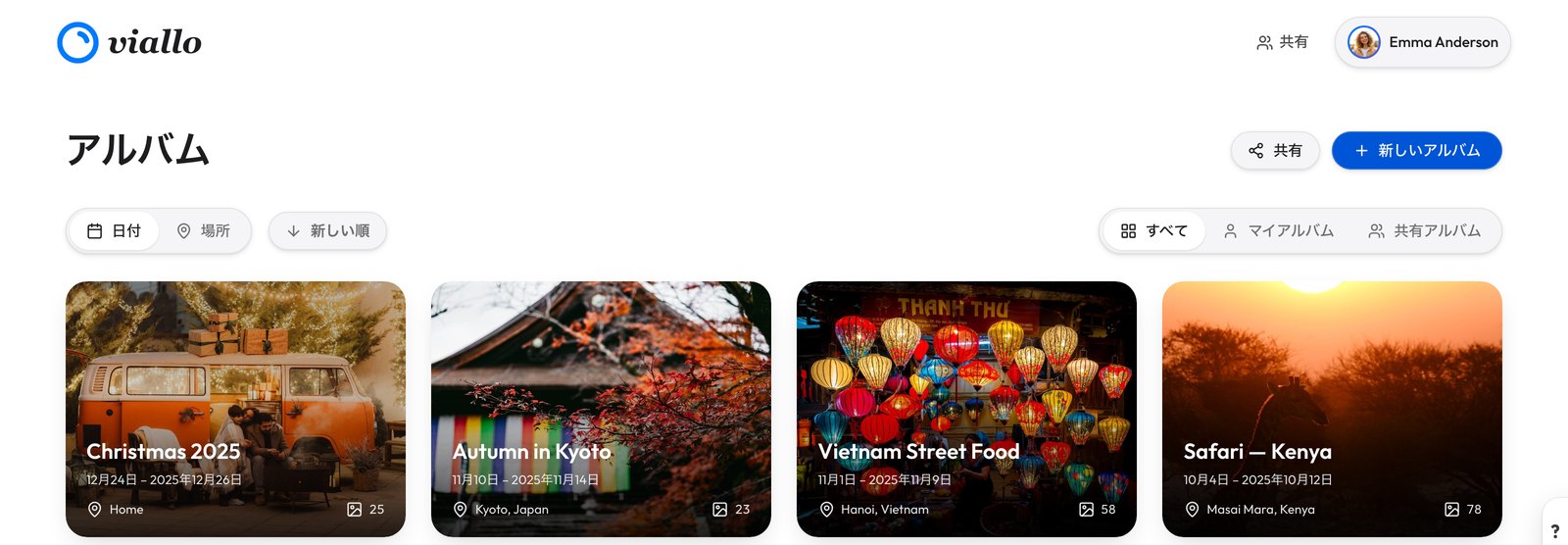
Nearly every screen comes over: the navigation and the tabs, the albums screen, each album with its photo grid and lightbox, the upload sheet, the Share window, the Atlas and the map, every settings screen, your profile and account, the help screen and the feedback form, down to the messages that tell you a save worked or did not. Once you choose a language, nearly every email and phone notification Viallo sends you is written in it too. Plural forms follow each language's own rules, so Czech says 2 fotky and 5 fotek where English would say photos both times.
On the albums screen that means the title, the Share and New Album buttons, the filter between all, your own and shared albums, the sort control and the dates on the album cards, which are written the way each language writes dates.
Viallo is a private photo sharing platform, and the translation does not change what it is: albums go out as links that open in a browser with no account, the photos stay at full resolution, and they are grouped by the places they were taken. The language changes the words around all of that, and nothing else.
How the app picks your language
It asks once, and it asks in your language. When your phone is set to a language Viallo speaks and the app is showing a different one, a small card appears at the bottom of the settings screens. On a German phone it reads Viallo auf Deutsch nutzen?, with the button to switch written in German and the button to keep the current language written in the current one, so whichever of the two you read, you can answer.
Saying no is an answer about that one language. Keep English on a German phone, and the app will not ask the German question again on that device for a year; it would still ask once if the phone were later set to French. That answer stays on the device and is not written into your account, on purpose: it is a fact about that phone, and it should not follow you to a borrowed one abroad.
Finding your way back from a language you cannot read
The language screen is under Settings, Language, and it is built for the moment everybody has had at least once: you tapped the wrong row and now the whole interface is in a script you do not read. Every language on the list is written twice, in its own spelling and in the language currently on screen, so a phone switched to Japanese by mistake still shows the word English, spelled in English. The search box matches either name, the English one and the language code, and it ignores accents, so typing cestina finds Čeština.
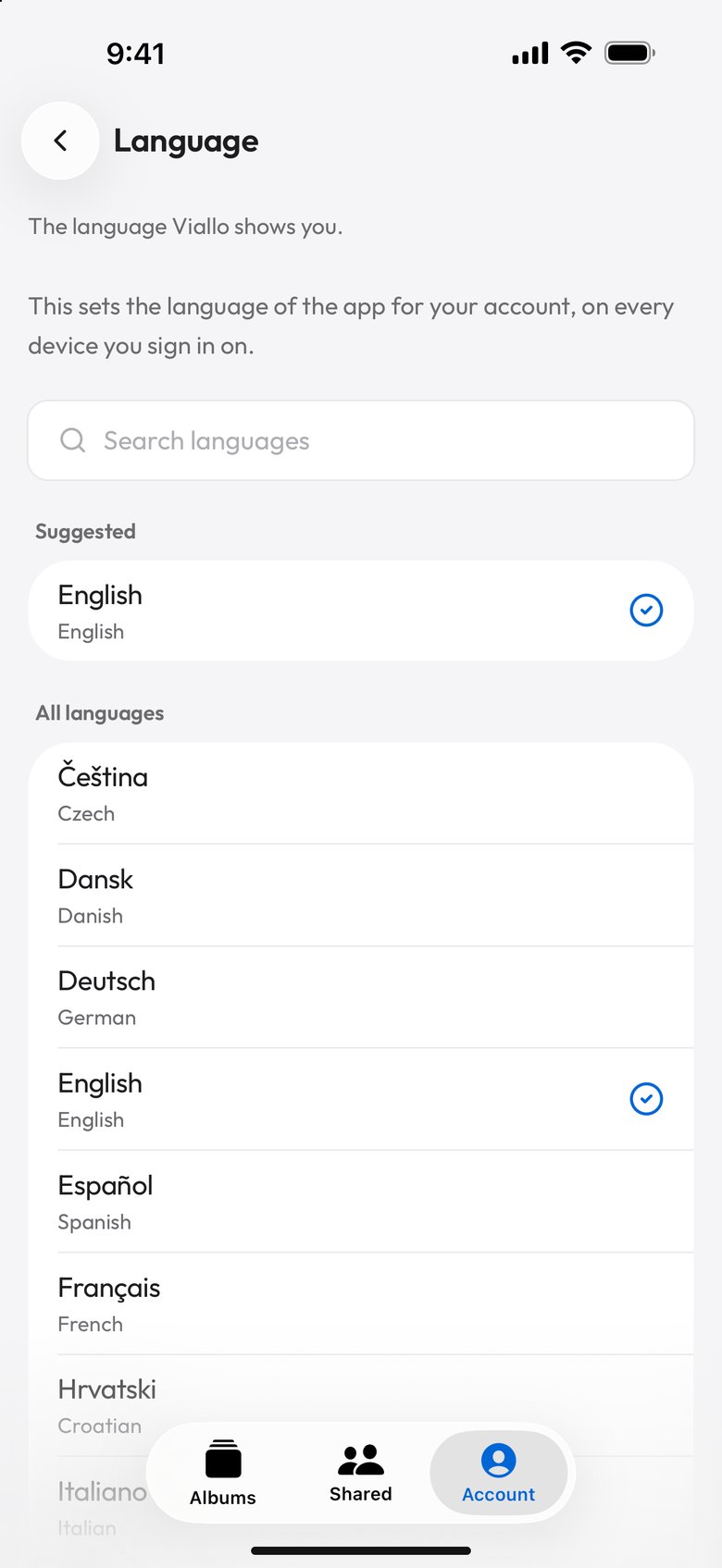
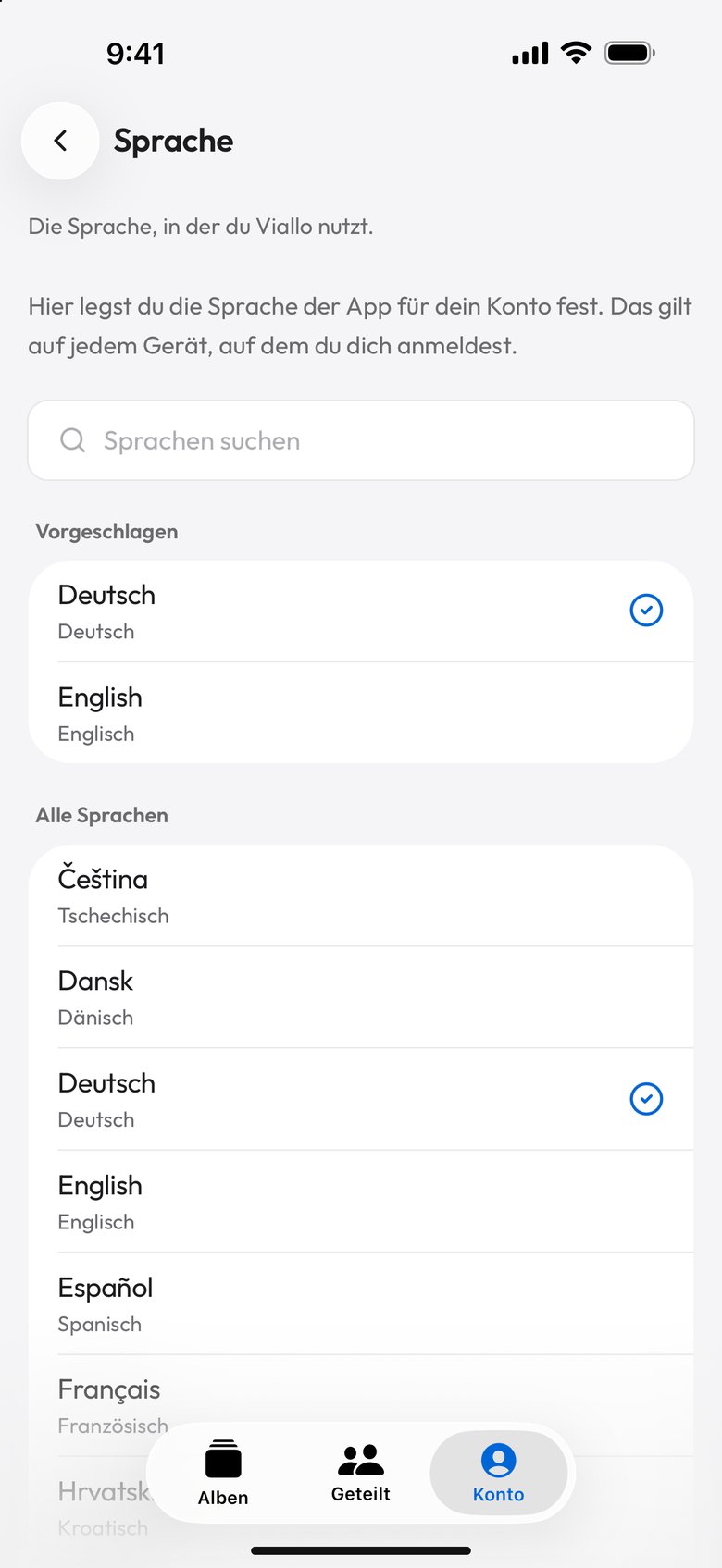
At the top, a short Suggested list holds your phone's own languages, English and the one you are using now. The choice is saved to your account, and the screen says exactly what that means: it sets the language of the app on every device you sign in on. Sign in on a new tablet and it opens in your language without asking.
What stays in English
The language belongs to your account, so it reaches what you see while signed in. These parts stay in English:
- The album page and a public Atlas link, for a viewer without a Viallo account. A guest has no language setting, so the page is in English whatever language you use and whatever their browser is set to. A viewer signed in to their own account sees it in their own language. The photos and the album title are yours, so most of what a guest looks at is not language at all.
- The notes a link shows instead of the album when it has expired, been turned off or belonged to a deleted album, and the preview a chat app draws when you paste a link.
- A few emails: an invitation to someone who has no Viallo account, the invitations you add while creating a new album, the code that confirms an account made with a passkey, and the link that confirms a new email address.
- Messages that come from the server, such as the reason an upload was refused.
- On an iPhone, the system's questions about the camera, the photo library and your location, and the progress lines when you send photos to Viallo from the Share sheet.
- A handful of labels: the title of your capsules list and the sheet that asks to turn on notifications.
- The website and this blog.
Viallo offers no right-to-left language. Arabic, Hebrew, Persian and Urdu need every screen to mirror, not only its words, and a layout that does not mirror shows their readers albums that run the wrong way. The same care covers the 24 languages on the list: every translated line exists in all of them, so a translated screen is as complete in Greek as it is in German.

Who this is for
The language setting matters most to whoever keeps the albums. Everyone else in the family opens a link, and for them Viallo is mostly free of language: a link that opens without an app or an account, covered in sharing photos without an account, and photos at their full size. If your family is spread across countries, sharing photos with family who live far away goes through the rest of the setup, and sharing photos with grandparents covers the relatives least likely to want a new app.
Languages in Viallo: common questions
Is Viallo available in Spanish?
Yes, and in 23 other languages. Choose Español under Settings, Language, and your albums, the Share window, the Atlas, the map, the settings and nearly every email Viallo sends you are in Spanish, on every device you sign in on. Brazilian Portuguese is there too; European Portuguese is not a separate option.
How do I change the language in Viallo?
Open Settings and choose Language, then pick one from the list or search for it. Viallo saves the choice to your account and redraws the app in it straight away. If you have ended up in a language you cannot read, each row also shows the language's name in its own spelling, and the search accepts the English name.
Will people I share an album with see it in my language?
No, they see it in theirs when they are signed in to a Viallo account: the album page follows the language of the person viewing it, never the owner's. A guest without an account sees it in English, whatever their browser is set to. The photos and the album title are what viewers mostly look at, and they stay as you wrote them.
Why did the app ask me to switch languages?
Because your phone is set to a language Viallo speaks and the app was showing another. Viallo asks once per language on each device, on the settings screens, and remembers the answer for a year if you keep the current one. The answer stays on that device and is never added to your account.
Does Viallo support Arabic or Hebrew?
No. Viallo offers no right-to-left language: for Arabic, Hebrew, Persian and Urdu the whole layout has to mirror, not only the words. All 24 languages Viallo offers are written left to right.